# Actions
> Source: https://support.usebluehill.com/automations-actions | Updated: 2026-10-27T18:49:55Z
## Add and order actions
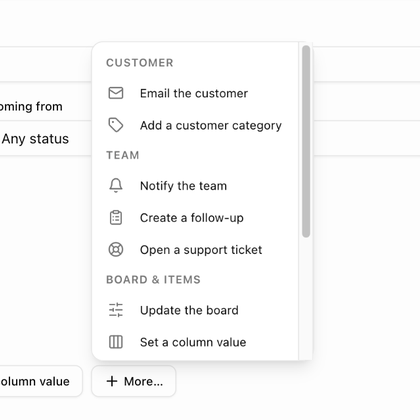 When a rule has no actions yet, the most common ones are offered as buttons (for example **Email the customer**, **Notify the team**, **Update the board** and **Set a column value**) with **More…** for the rest. Once an action is in place, use **Add action** to add another. The menu is grouped into **Customer**, **Team**, **Board & items** and **Integrations**, and only lists the actions the chosen trigger allows.
Each action becomes a numbered card headed with its label and a short summary. Use **Move up**, **Move down** and **Remove action** on the card. Actions run in order, so put the action that creates something (a board, a customer record) before the actions that use it. A rule can hold up to ten actions.
Everything an action changes is credited to **Automation · *rule name***: in an item's change history, on notes it writes, on tickets it opens and in the bell notification it sends.
## Customer actions
| Action | Settings |
|---|---|
| **Email the customer** | **Send to** (*Primary contact* or *All customer contacts*), **Subject**, **Message**, an optional button, and a live preview. See [Email the customer](./automations-email-the-customer). Boards without a customer skip this action. |
| **Add a customer category** | **Category**. Add-only: the category is never removed by an automation. |
| **Create a board from a template** | **Template**, **Board name** (default *{{customer_name}} — {{template_name}}*) and **Board members (optional)**. The board is built for the customer behind the trigger, and the template's own rules then apply to it. |
| **Assign the customer owner** | **Owner**, and **Only when the record has no owner**. With it on, *A record somebody already owns is left alone*; off, the action *Replaces the current owner, if any*. |
| **Set the pipeline stage** | **Stage**. Only prospects have a pipeline stage, so the action is skipped for customers. The reserved *Lost* stage cannot be set by an automation. |
| **Create or merge a customer from the submission** | **Creates** (*Follow the block*, *A prospect* or *A customer*), **Owner**, **Merge by email** and **Categories to add**. Form rules only; one per rule, and it must come before any action that uses the record. |
## Team actions
When a rule has no actions yet, the most common ones are offered as buttons (for example **Email the customer**, **Notify the team**, **Update the board** and **Set a column value**) with **More…** for the rest. Once an action is in place, use **Add action** to add another. The menu is grouped into **Customer**, **Team**, **Board & items** and **Integrations**, and only lists the actions the chosen trigger allows.
Each action becomes a numbered card headed with its label and a short summary. Use **Move up**, **Move down** and **Remove action** on the card. Actions run in order, so put the action that creates something (a board, a customer record) before the actions that use it. A rule can hold up to ten actions.
Everything an action changes is credited to **Automation · *rule name***: in an item's change history, on notes it writes, on tickets it opens and in the bell notification it sends.
## Customer actions
| Action | Settings |
|---|---|
| **Email the customer** | **Send to** (*Primary contact* or *All customer contacts*), **Subject**, **Message**, an optional button, and a live preview. See [Email the customer](./automations-email-the-customer). Boards without a customer skip this action. |
| **Add a customer category** | **Category**. Add-only: the category is never removed by an automation. |
| **Create a board from a template** | **Template**, **Board name** (default *{{customer_name}} — {{template_name}}*) and **Board members (optional)**. The board is built for the customer behind the trigger, and the template's own rules then apply to it. |
| **Assign the customer owner** | **Owner**, and **Only when the record has no owner**. With it on, *A record somebody already owns is left alone*; off, the action *Replaces the current owner, if any*. |
| **Set the pipeline stage** | **Stage**. Only prospects have a pipeline stage, so the action is skipped for customers. The reserved *Lost* stage cannot be set by an automation. |
| **Create or merge a customer from the submission** | **Creates** (*Follow the block*, *A prospect* or *A customer*), **Owner**, **Merge by email** and **Categories to add**. Form rules only; one per rule, and it must come before any action that uses the record. |
## Team actions
 | Action | Settings |
|---|---|
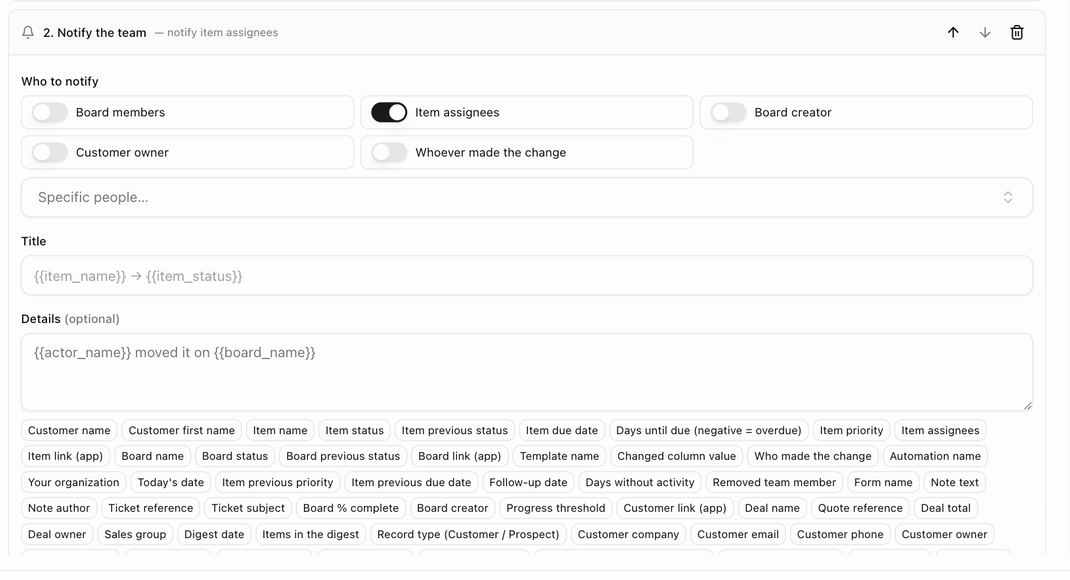
| **Notify the team** | **Who to notify**: **Board members**, **Item assignees**, **Board creator**, **Customer owner**, **Whoever made the change** (shown as **Whoever created the record** on customer triggers) and **Specific people…**. Then a **Title**, optional **Details**, and **Also send an email copy**. Recipients get a bell notification that links to the board, deal room or customer; with the email copy on, they also get an email with an **Open in BlueHill** button. For prospects, people whose teams are hidden from prospects are never notified. |
| **Create a follow-up** | **Follow up in** N **day(s)** and a **Note**. The follow-up appears under **Follow-ups** on the customer. |
| **Open a support ticket** | **Subject**, **Description (optional)**, **Priority** (*Default*, *low*, *medium*, *high* or *urgent*), **Assign to** (*Routing rules decide* by default), **Brand** and **Link the ticket to the item**. The ticket is created for the board's customer as *Automation · rule name* and goes through your routing rules and SLAs. |
| **Send the digest email** | The only action on digest triggers. See [Scheduled digests](./automations-timing-and-digests#scheduled-digests). |
| **Start the review chain** | Form rules only. Moves the submission to the first review step and to *In review*. Review must be turned on for the form first. |
## Board & items actions
| Action | Settings |
|---|---|
| **Notify the team** | **Who to notify**: **Board members**, **Item assignees**, **Board creator**, **Customer owner**, **Whoever made the change** (shown as **Whoever created the record** on customer triggers) and **Specific people…**. Then a **Title**, optional **Details**, and **Also send an email copy**. Recipients get a bell notification that links to the board, deal room or customer; with the email copy on, they also get an email with an **Open in BlueHill** button. For prospects, people whose teams are hidden from prospects are never notified. |
| **Create a follow-up** | **Follow up in** N **day(s)** and a **Note**. The follow-up appears under **Follow-ups** on the customer. |
| **Open a support ticket** | **Subject**, **Description (optional)**, **Priority** (*Default*, *low*, *medium*, *high* or *urgent*), **Assign to** (*Routing rules decide* by default), **Brand** and **Link the ticket to the item**. The ticket is created for the board's customer as *Automation · rule name* and goes through your routing rules and SLAs. |
| **Send the digest email** | The only action on digest triggers. See [Scheduled digests](./automations-timing-and-digests#scheduled-digests). |
| **Start the review chain** | Form rules only. Moves the submission to the first review step and to *In review*. Review must be turned on for the form first. |
## Board & items actions
 | Action | Settings |
|---|---|
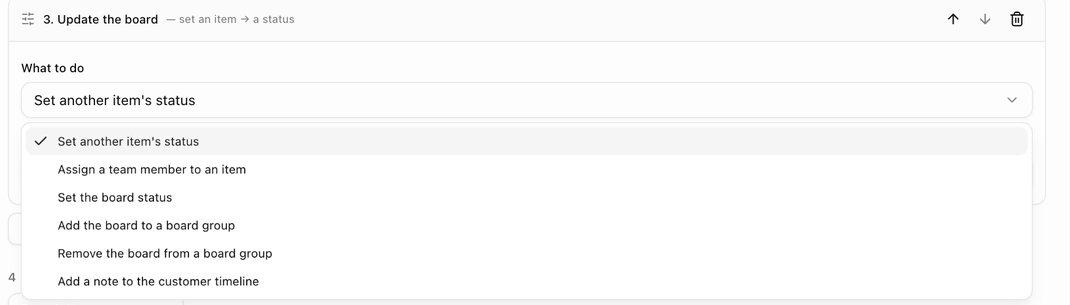
| **Update the board** | **What to do**: *Set another item's status* (**Item**, **Set status to**), *Assign a team member to an item* (**Item**, **Assign**), *Set the board status* (**Set the board status to**; the board switches to manual status mode so the automatic status does not overwrite it), *Add the board to a board group* or *Remove the board from a board group* (pick the group; boards already in the group are left as they are), or *Add a note to the customer timeline* (**Note**; on a board with no customer the note lands on the board only). |
| **Set a column value** | **Item**, **Column** and **Value**. The value control matches the column type; checkboxes offer *Checked* and *Unchecked*. |
| **Set priority** | **Item** and **Set priority to**. |
| **Set the due date** | **Item** and **Due date**: *Days from today*, *Days from its current due date* or *Clear the due date*. Items without a due date are skipped by the second option. |
| **Publish to the portal** | **Item** and a **Visibility** switch: *Show in the customer portal* or *Hide from the customer portal*. |
| **Archive the board** | No settings. Archives the board, forcing its status to *Complete* like the **Archive** button, and cancels the board's pending automations. Not allowed on *A board is created*. |
Wherever an action asks for an **Item**, item triggers offer **This item (the one that triggered the rule)**; template and board rules can also pick a named item. Organization rules can only use *this item*.
## Integrations
| Action | Settings |
|---|---|
| **Send a webhook** | **Endpoint** and **Event type (optional)**. Posts a signed JSON message with the board, item, customer, deal and trigger facts to an endpoint set up on the **Webhooks** tab. See [Webhooks](./automations-webhooks). |
## Which actions each trigger allows
- **Item and board triggers**: every customer, team and board action except the form-only ones, plus **Send a webhook**.
- **A deal / quote is accepted**: **Email the customer**, **Notify the team**, **Create a follow-up**, **Open a support ticket**, **Add a customer category**, **Create a board from a template** and **Send a webhook**.
- **A customer or prospect is created**: the deal set plus **Assign the customer owner** and **Set the pipeline stage**. **A prospect is converted to a customer** adds **Assign the customer owner** only.
- **Form triggers**: the customer set plus **Set the pipeline stage**, **Create or merge a customer from the submission** and **Start the review chain**. *A review step is overdue* cannot create a customer or start the review again.
- **Digests**: **Send the digest email** only.
Next: [Email the customer](./automations-email-the-customer).
| Action | Settings |
|---|---|
| **Update the board** | **What to do**: *Set another item's status* (**Item**, **Set status to**), *Assign a team member to an item* (**Item**, **Assign**), *Set the board status* (**Set the board status to**; the board switches to manual status mode so the automatic status does not overwrite it), *Add the board to a board group* or *Remove the board from a board group* (pick the group; boards already in the group are left as they are), or *Add a note to the customer timeline* (**Note**; on a board with no customer the note lands on the board only). |
| **Set a column value** | **Item**, **Column** and **Value**. The value control matches the column type; checkboxes offer *Checked* and *Unchecked*. |
| **Set priority** | **Item** and **Set priority to**. |
| **Set the due date** | **Item** and **Due date**: *Days from today*, *Days from its current due date* or *Clear the due date*. Items without a due date are skipped by the second option. |
| **Publish to the portal** | **Item** and a **Visibility** switch: *Show in the customer portal* or *Hide from the customer portal*. |
| **Archive the board** | No settings. Archives the board, forcing its status to *Complete* like the **Archive** button, and cancels the board's pending automations. Not allowed on *A board is created*. |
Wherever an action asks for an **Item**, item triggers offer **This item (the one that triggered the rule)**; template and board rules can also pick a named item. Organization rules can only use *this item*.
## Integrations
| Action | Settings |
|---|---|
| **Send a webhook** | **Endpoint** and **Event type (optional)**. Posts a signed JSON message with the board, item, customer, deal and trigger facts to an endpoint set up on the **Webhooks** tab. See [Webhooks](./automations-webhooks). |
## Which actions each trigger allows
- **Item and board triggers**: every customer, team and board action except the form-only ones, plus **Send a webhook**.
- **A deal / quote is accepted**: **Email the customer**, **Notify the team**, **Create a follow-up**, **Open a support ticket**, **Add a customer category**, **Create a board from a template** and **Send a webhook**.
- **A customer or prospect is created**: the deal set plus **Assign the customer owner** and **Set the pipeline stage**. **A prospect is converted to a customer** adds **Assign the customer owner** only.
- **Form triggers**: the customer set plus **Set the pipeline stage**, **Create or merge a customer from the submission** and **Start the review chain**. *A review step is overdue* cannot create a customer or start the review again.
- **Digests**: **Send the digest email** only.
Next: [Email the customer](./automations-email-the-customer).