# Start from a recipe
> Source: https://support.usebluehill.com/automations-recipes | Updated: 2026-10-27T18:49:55Z
## Open the recipe library
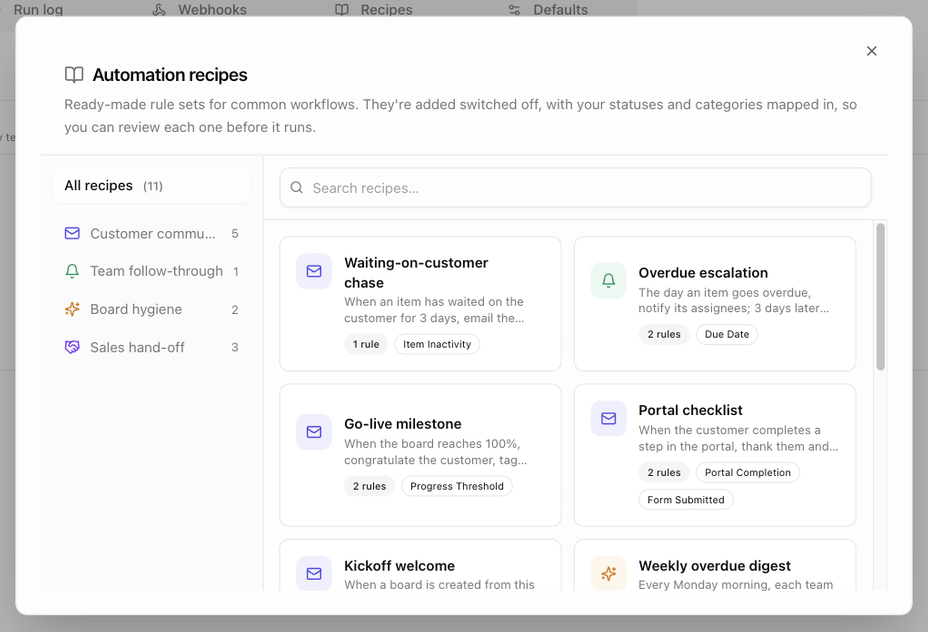 - Click **Recipes** on any Automations tab (organization, template or board), or
- Open **Operations → Automations → Recipes**. The tab explains that *Recipes are added switched off, with statuses and categories mapped to yours, so you can review each rule before it runs*, and the library opens on its own.
The **Automation recipes** dialog lists recipes as cards with a title, a one-line summary, how many rules the recipe adds and badges for the triggers it uses. The rail on the left filters by category (**All recipes** shows the count), and **Search recipes…** searches titles and summaries. The organization library holds 11 recipes; *Hand-off between teams* appears only on templates and boards.
| Category | Blurb |
|---|---|
| **Customer communication** | Keep customers informed without lifting a finger. |
| **Team follow-through** | Make sure nothing waits on a person who forgot. |
| **Board hygiene** | Catch boards and items that have gone quiet. |
| **Sales hand-off** | Turn a won deal into onboarding automatically. |
## Add a recipe
- Click **Recipes** on any Automations tab (organization, template or board), or
- Open **Operations → Automations → Recipes**. The tab explains that *Recipes are added switched off, with statuses and categories mapped to yours, so you can review each rule before it runs*, and the library opens on its own.
The **Automation recipes** dialog lists recipes as cards with a title, a one-line summary, how many rules the recipe adds and badges for the triggers it uses. The rail on the left filters by category (**All recipes** shows the count), and **Search recipes…** searches titles and summaries. The organization library holds 11 recipes; *Hand-off between teams* appears only on templates and boards.
| Category | Blurb |
|---|---|
| **Customer communication** | Keep customers informed without lifting a finger. |
| **Team follow-through** | Make sure nothing waits on a person who forgot. |
| **Board hygiene** | Catch boards and items that have gone quiet. |
| **Sales hand-off** | Turn a won deal into onboarding automatically. |
## Add a recipe
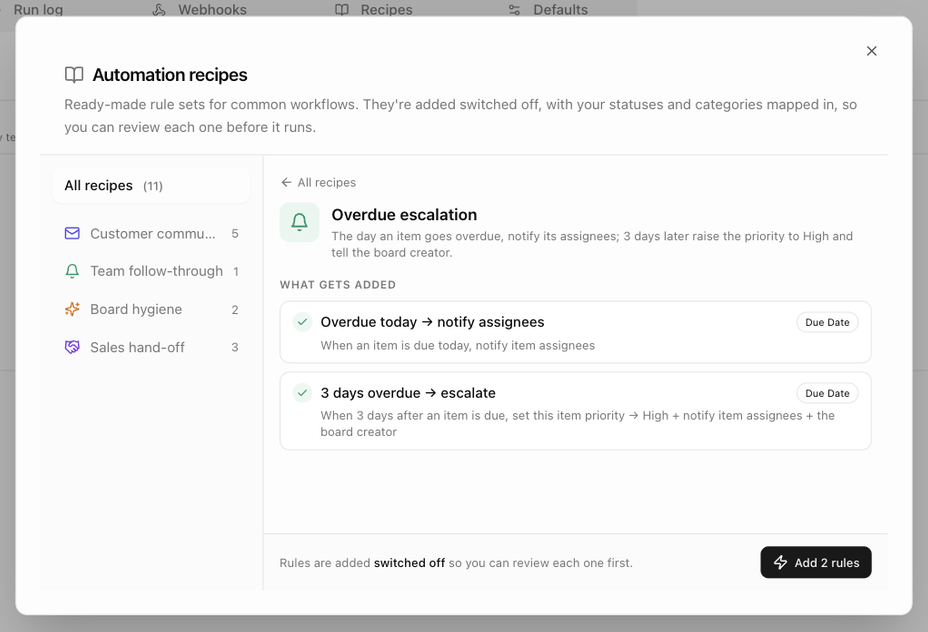 1. Click a card. The dialog shows *Matching statuses and categories to yours…* while it looks for the statuses and categories the recipe needs.
2. Review **What gets added**: one line per rule with its name, trigger and summary. A tick means the rule is ready; a warning means it is *Skipped until the names above are mapped* or *Not available in this scope*.
3. If a box headed **Map these first** appears, the recipe uses a status or category your workspace does not have, for example *Nothing in your workspace is called status "Waiting on Customer"*. Create or rename yours, then come back; the rules that need it are skipped otherwise.
4. Click **Add N rules**. BlueHill confirms with *N automations added (off) — review, then switch on*.
5. Open each new rule, adjust the wording, recipients and timing, and switch it **On**.
Recipes are added to the scope you opened them from: the organization, the template or the board. They never ask which one.
## The recipes
| Recipe | Category | Available on | What it adds |
|---|---|---|---|
| **Waiting-on-customer chase** | Customer communication | Template, board, organization | *When an item has waited on the customer for 3 days, email the primary contact a gentle nudge and notify the assignee.* One rule; needs a status named *Waiting on Customer*. |
| **Overdue escalation** | Team follow-through | Template, board, organization | *The day an item goes overdue, notify its assignees; 3 days later raise the priority to High and tell the board creator.* Two rules. |
| **Go-live milestone** | Customer communication | Template, organization | *When the board reaches 100%, congratulate the customer, tag them as Live and archive the board a week later.* Two rules; needs a customer category named *Live*. |
| **Hand-off between teams** | Team follow-through | Template, board | *When an item reaches Ready for Review, assign the reviewer's step and open a ticket if the customer is a VIP.* One rule that notifies the board creator; needs a status named *Ready for Review*. |
| **Portal checklist** | Customer communication | Template, board, organization | *When the customer completes a step in the portal, thank them and notify the assignee; if a form is submitted, note it on the timeline.* Two rules. |
| **Kickoff welcome** | Customer communication | Template, organization | *When a board is created from this template, welcome the customer and give the team a heads-up.* One rule. |
| **Weekly overdue digest** | Board hygiene | Organization, template | *Every Monday morning, each team member gets one email listing their overdue items.* One digest rule. |
| **Quiet board check** | Board hygiene | Organization, template | *When a board has had no activity for 14 days, create a follow-up for the team and notify the board creator.* One rule. |
| **Deal won → onboarding board** | Sales hand-off | Organization | *When a quote is accepted, build the onboarding board for the customer and tell the team.* One rule; needs a template named *Customer onboarding*. |
| **New customer → onboarding board** | Customer communication | Organization | *When a customer record is created, build the onboarding board for it and tell the owner and whoever created it.* One rule; needs the *Customer onboarding* template. |
| **New prospect → sales follow-up** | Sales hand-off | Organization | *When a prospect is created, alert its owner and schedule a follow-up for two days out.* One rule. |
| **Prospect converted → customer hand-off** | Sales hand-off | Organization | *When a prospect becomes a customer (by hand or through a won deal), build the onboarding board and tell the owner.* One rule; needs the *Customer onboarding* template. |
> **Tip:** a recipe is a starting point, not a commitment. Delete the rules you do not need and keep the rest.
Next: [Webhooks](./automations-webhooks).
1. Click a card. The dialog shows *Matching statuses and categories to yours…* while it looks for the statuses and categories the recipe needs.
2. Review **What gets added**: one line per rule with its name, trigger and summary. A tick means the rule is ready; a warning means it is *Skipped until the names above are mapped* or *Not available in this scope*.
3. If a box headed **Map these first** appears, the recipe uses a status or category your workspace does not have, for example *Nothing in your workspace is called status "Waiting on Customer"*. Create or rename yours, then come back; the rules that need it are skipped otherwise.
4. Click **Add N rules**. BlueHill confirms with *N automations added (off) — review, then switch on*.
5. Open each new rule, adjust the wording, recipients and timing, and switch it **On**.
Recipes are added to the scope you opened them from: the organization, the template or the board. They never ask which one.
## The recipes
| Recipe | Category | Available on | What it adds |
|---|---|---|---|
| **Waiting-on-customer chase** | Customer communication | Template, board, organization | *When an item has waited on the customer for 3 days, email the primary contact a gentle nudge and notify the assignee.* One rule; needs a status named *Waiting on Customer*. |
| **Overdue escalation** | Team follow-through | Template, board, organization | *The day an item goes overdue, notify its assignees; 3 days later raise the priority to High and tell the board creator.* Two rules. |
| **Go-live milestone** | Customer communication | Template, organization | *When the board reaches 100%, congratulate the customer, tag them as Live and archive the board a week later.* Two rules; needs a customer category named *Live*. |
| **Hand-off between teams** | Team follow-through | Template, board | *When an item reaches Ready for Review, assign the reviewer's step and open a ticket if the customer is a VIP.* One rule that notifies the board creator; needs a status named *Ready for Review*. |
| **Portal checklist** | Customer communication | Template, board, organization | *When the customer completes a step in the portal, thank them and notify the assignee; if a form is submitted, note it on the timeline.* Two rules. |
| **Kickoff welcome** | Customer communication | Template, organization | *When a board is created from this template, welcome the customer and give the team a heads-up.* One rule. |
| **Weekly overdue digest** | Board hygiene | Organization, template | *Every Monday morning, each team member gets one email listing their overdue items.* One digest rule. |
| **Quiet board check** | Board hygiene | Organization, template | *When a board has had no activity for 14 days, create a follow-up for the team and notify the board creator.* One rule. |
| **Deal won → onboarding board** | Sales hand-off | Organization | *When a quote is accepted, build the onboarding board for the customer and tell the team.* One rule; needs a template named *Customer onboarding*. |
| **New customer → onboarding board** | Customer communication | Organization | *When a customer record is created, build the onboarding board for it and tell the owner and whoever created it.* One rule; needs the *Customer onboarding* template. |
| **New prospect → sales follow-up** | Sales hand-off | Organization | *When a prospect is created, alert its owner and schedule a follow-up for two days out.* One rule. |
| **Prospect converted → customer hand-off** | Sales hand-off | Organization | *When a prospect becomes a customer (by hand or through a won deal), build the onboarding board and tell the owner.* One rule; needs the *Customer onboarding* template. |
> **Tip:** a recipe is a starting point, not a commitment. Delete the rules you do not need and keep the rest.
Next: [Webhooks](./automations-webhooks).