# Check the run log
> Source: https://support.usebluehill.com/automations-run-log | Updated: 2026-10-27T18:49:55Z
## Where to find it
- **Operations → Automations → Run log** lists the runs of organization rules.
- On a board or a template, switch the **Automations** tab from **Rules** to **Run log** to see the runs on that board or on boards built from that template.
- On a form's **Workflow** tab, the **Recent runs** rail lists the latest runs for the form.
Until something has run, the log reads **No runs yet**: *Every time an automation fires it shows up here with what it did — or why it was skipped.*
## The run table
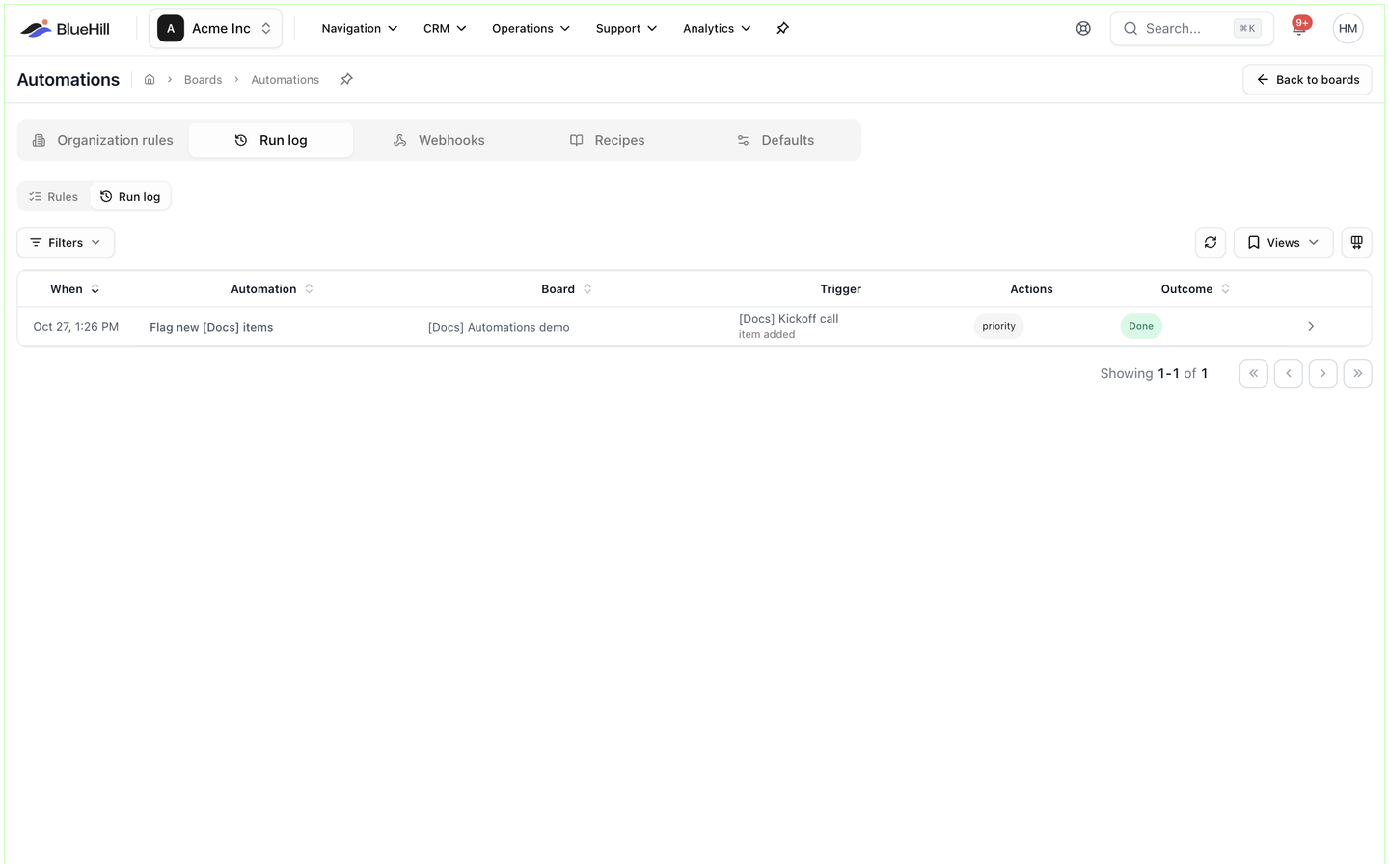 | Column | Shows |
|---|---|
| **When** | When the rule fired. A held run adds a second line, *runs at …*, with the reason it is waiting. |
| **Automation** | The rule's name. |
| **Board** | The board, or a dash for deal and customer runs. |
| **Trigger** | What fired it: the item, board, customer or deal on the first line and the trigger name underneath. *chained ×N* marks a run that another automation set off. |
| **Actions** | A short badge per action, such as *email*, *notify* or *update · set item status*, marked *(skipped)* or *(failed)* when needed. |
| **Outcome** | The run's status and, where there is one, the reason. |
Click a row to open the run. The toolbar also has **Refresh**, **Views** for saving a set of filters, and a column picker.
## Filter runs
| Column | Shows |
|---|---|
| **When** | When the rule fired. A held run adds a second line, *runs at …*, with the reason it is waiting. |
| **Automation** | The rule's name. |
| **Board** | The board, or a dash for deal and customer runs. |
| **Trigger** | What fired it: the item, board, customer or deal on the first line and the trigger name underneath. *chained ×N* marks a run that another automation set off. |
| **Actions** | A short badge per action, such as *email*, *notify* or *update · set item status*, marked *(skipped)* or *(failed)* when needed. |
| **Outcome** | The run's status and, where there is one, the reason. |
Click a row to open the run. The toolbar also has **Refresh**, **Views** for saving a set of filters, and a column picker.
## Filter runs
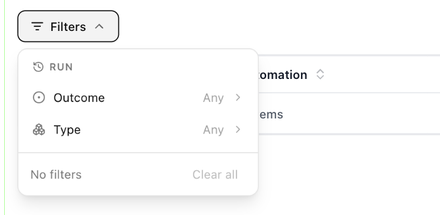 The **Run** filter panel has two fields: **Outcome**, with the statuses below, and **Type**: **Items**, **Boards**, **Deals**, **Customers**, **Form submissions** or **Digests**.
## Run statuses
| Status | Meaning |
|---|---|
| **Queued** | About to run. |
| **Scheduled** | Waiting for its time: *waiting out the delay*, *waiting for business hours*, *waiting for a weekday* or *scheduled digest*. |
| **Running** | In progress. |
| **Done** | Finished. Individual actions may still have been skipped; open the run to see. |
| **Failed** | At least one action could not complete, for example a webhook that never answered. |
| **Cancelled** | Stopped before it ran. The run says why. |
| **Skipped** | The rule fired but had nothing to do, for example because the conditions did not match. |
## The run detail
The **Run** filter panel has two fields: **Outcome**, with the statuses below, and **Type**: **Items**, **Boards**, **Deals**, **Customers**, **Form submissions** or **Digests**.
## Run statuses
| Status | Meaning |
|---|---|
| **Queued** | About to run. |
| **Scheduled** | Waiting for its time: *waiting out the delay*, *waiting for business hours*, *waiting for a weekday* or *scheduled digest*. |
| **Running** | In progress. |
| **Done** | Finished. Individual actions may still have been skipped; open the run to see. |
| **Failed** | At least one action could not complete, for example a webhook that never answered. |
| **Cancelled** | Stopped before it ran. The run says why. |
| **Skipped** | The rule fired but had nothing to do, for example because the conditions did not match. |
## The run detail
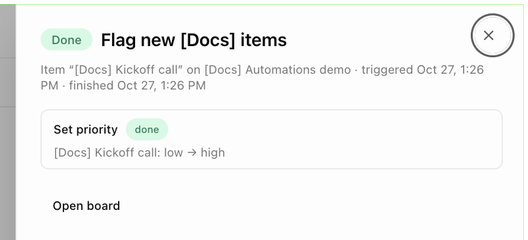 Opening a run shows its status and rule name, then a line such as *Item "Kickoff call" on Automations demo · triggered Oct 27, 1:26 PM · finished Oct 27, 1:26 PM*. Each action gets a card with an outcome badge (**done**, **skipped** or **failed**) and the detail of what happened: *Kickoff call: low → high* under **Set priority**, the **To** and **Subject** of an email with the sent message underneath, the notification **Title** and *N notified, N emailed*, *Follow-up on …*, *Added "Live"*, *Archived · status set to Complete*, the ticket reference with an **open** link, the webhook delivery, or *Created "…" (8 items)* with an **open board** link. Skipped actions give the reason, for example *the board has no linked customer*.
Buttons at the bottom:
- **Cancel run** on a queued or scheduled run. BlueHill confirms with *Run cancelled*.
- **Retry failed steps** on a failed run. The run is queued again and only the failed actions are repeated.
- **Open board**, **Open deal room** or **Open customer** to jump to the record.
## Why a run was cancelled
A cancelled run shows *Stopped because …* with one of these reasons:
| Reason | What happened |
|---|---|
| *the automation was deleted* / *the automation was switched off* | Someone deleted or paused the rule while the run was waiting. |
| *the board was archived* | Archiving a board cancels its pending runs. |
| *the board no longer uses this template* | The board was moved off the template that owns the rule. |
| *template automations are paused on this board* / *organization automations are paused on this board* | **Run on this board** was switched off. See [Pause inherited rules on one board](./automations-where-rules-live#pause-inherited-rules-on-one-board). |
| *the item or record is gone, merged, archived or moved to another board* | The subject of the run no longer exists where the rule expects it. |
| *the condition stopped being true before it ran* | A delayed run re-checked its conditions and they no longer matched. |
| *activity resumed before it ran* | An inactivity rule was waiting and the item or board became active again. |
| *too many chained automations (loop guard)* | Automations set each other off more than three times in a row. |
| *cancelled by a team member* | Someone clicked **Cancel run**. |
Next: [Start from a recipe](./automations-recipes).
Opening a run shows its status and rule name, then a line such as *Item "Kickoff call" on Automations demo · triggered Oct 27, 1:26 PM · finished Oct 27, 1:26 PM*. Each action gets a card with an outcome badge (**done**, **skipped** or **failed**) and the detail of what happened: *Kickoff call: low → high* under **Set priority**, the **To** and **Subject** of an email with the sent message underneath, the notification **Title** and *N notified, N emailed*, *Follow-up on …*, *Added "Live"*, *Archived · status set to Complete*, the ticket reference with an **open** link, the webhook delivery, or *Created "…" (8 items)* with an **open board** link. Skipped actions give the reason, for example *the board has no linked customer*.
Buttons at the bottom:
- **Cancel run** on a queued or scheduled run. BlueHill confirms with *Run cancelled*.
- **Retry failed steps** on a failed run. The run is queued again and only the failed actions are repeated.
- **Open board**, **Open deal room** or **Open customer** to jump to the record.
## Why a run was cancelled
A cancelled run shows *Stopped because …* with one of these reasons:
| Reason | What happened |
|---|---|
| *the automation was deleted* / *the automation was switched off* | Someone deleted or paused the rule while the run was waiting. |
| *the board was archived* | Archiving a board cancels its pending runs. |
| *the board no longer uses this template* | The board was moved off the template that owns the rule. |
| *template automations are paused on this board* / *organization automations are paused on this board* | **Run on this board** was switched off. See [Pause inherited rules on one board](./automations-where-rules-live#pause-inherited-rules-on-one-board). |
| *the item or record is gone, merged, archived or moved to another board* | The subject of the run no longer exists where the rule expects it. |
| *the condition stopped being true before it ran* | A delayed run re-checked its conditions and they no longer matched. |
| *activity resumed before it ran* | An inactivity rule was waiting and the item or board became active again. |
| *too many chained automations (loop guard)* | Automations set each other off more than three times in a row. |
| *cancelled by a team member* | Someone clicked **Cancel run**. |
Next: [Start from a recipe](./automations-recipes).