# Webhooks
> Source: https://support.usebluehill.com/automations-webhooks | Updated: 2026-10-27T18:49:55Z
## The Webhooks tab
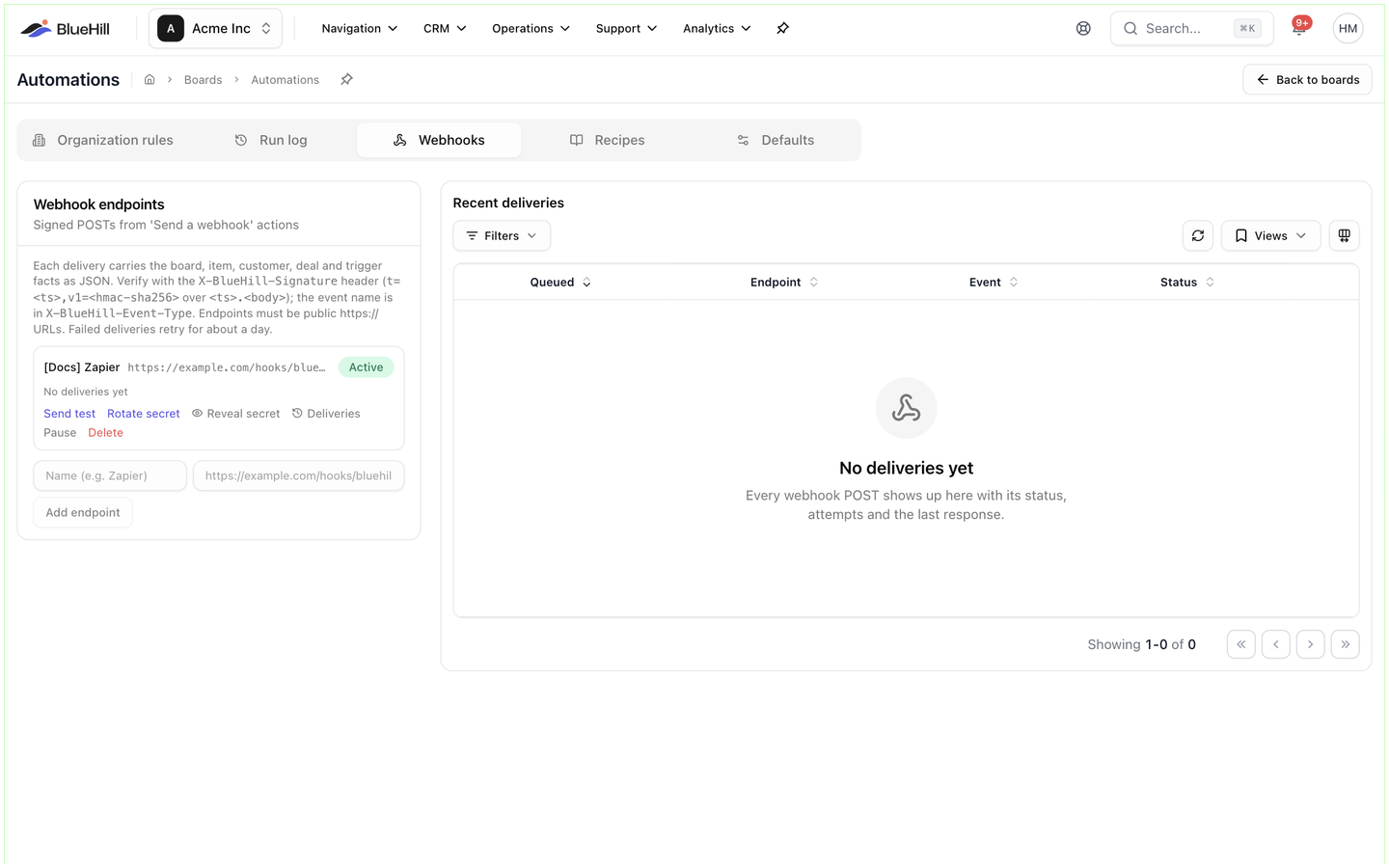 **Operations → Automations → Webhooks** has two parts: the **Webhook endpoints** card on the left (*Signed POSTs from 'Send a webhook' actions*) and **Recent deliveries** on the right. The card's help text explains how messages are signed and ends with the two rules that matter most: endpoints must be public *https://* URLs, and failed deliveries retry for about a day.
## Add an endpoint
1. In the **Webhook endpoints** card, enter a **Name** (for example *Zapier*) and the **URL**.
2. Click **Add endpoint**.
3. Copy the **signing secret** that appears. It is shown once; later you can **Reveal secret** or **Rotate secret** from the endpoint card.
The URL must start with *https://* and resolve to a public host. You can add up to 25 endpoints.
## The endpoint card
**Operations → Automations → Webhooks** has two parts: the **Webhook endpoints** card on the left (*Signed POSTs from 'Send a webhook' actions*) and **Recent deliveries** on the right. The card's help text explains how messages are signed and ends with the two rules that matter most: endpoints must be public *https://* URLs, and failed deliveries retry for about a day.
## Add an endpoint
1. In the **Webhook endpoints** card, enter a **Name** (for example *Zapier*) and the **URL**.
2. Click **Add endpoint**.
3. Copy the **signing secret** that appears. It is shown once; later you can **Reveal secret** or **Rotate secret** from the endpoint card.
The URL must start with *https://* and resolve to a public host. You can add up to 25 endpoints.
## The endpoint card
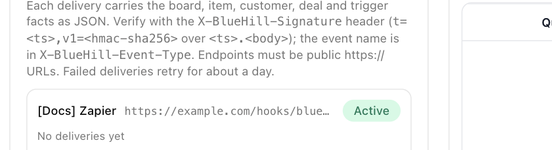 Each endpoint shows its name, URL and an **Active** or **Paused** badge, then its last delivery (*Last delivery 5m ago · delivered (HTTP 200)* or *No deliveries yet*) and these links:
| Link | What it does |
|---|---|
| **Send test** | Queues a test event; it posts within a few seconds and appears under **Recent deliveries**. |
| **Rotate secret** | Issues a new signing secret. Confirm in **Rotate the signing secret?**; deliveries signed with the new secret start immediately, so update the receiving side first. |
| **Reveal secret** / **Hide secret** | Shows the current secret with a **Copy secret** button. |
| **Deliveries** | Opens the list of deliveries to this endpoint only. |
| **Pause** / **Resume** | Pausing keeps deliveries queued (they are retried every 15 minutes) until you resume. Rules that use a paused endpoint show **Needs attention**. |
| **Delete** | Confirm in **Delete this endpoint?**. The URL stops receiving events immediately, and rules that use it skip the webhook step. |
## Use an endpoint in a rule
1. In the rule editor, add **Send a webhook** from the **Integrations** group.
2. Pick the **Endpoint**.
3. Optionally set an **Event type**. Without one, the event type is *board_automation.* followed by the trigger name, for example *board_automation.task_status*. Event types may only contain lowercase letters, digits, dots, underscores and hyphens.
See [Actions](./automations-actions#integrations).
## What is sent
Each delivery is a JSON POST with an *id*, *event_type*, *created_at*, the rule, the run id and a *data* object holding the trigger, the actor, the board, the item, the customer, the deal or submission where relevant, and the rendered merge fields.
Headers:
| Header | Contents |
|---|---|
| **X-BlueHill-Signature** | *t=timestamp,v1=signature*, where the signature is an HMAC-SHA256 of *timestamp.body* using the endpoint's secret. Verify it before trusting a message. |
| **X-BlueHill-Event-Type** | The event type. |
| **X-BlueHill-Event-Id** and **X-BlueHill-Delivery-Id** | Identifiers for the event and this attempt, useful for de-duplicating retries. |
Your endpoint should answer within five seconds with any 2xx status. Anything else counts as a failed attempt.
## Deliveries and retries
**Recent deliveries** lists every POST with **Queued** (and *retry at …* when a retry is pending), **Endpoint**, **Event** and **Status** (*Pending*, *Delivered* or *Failed*, with the HTTP status and the number of attempts). **Filters** narrows the list by status, **Views** saves a filter set, and **Refresh** reloads it. Until something has been sent, the list reads *No deliveries yet*.
Failed deliveries are retried after 1, 5, 30, 120, 360 and 1440 minutes before BlueHill gives up. Click a delivery to see the error, the **Next attempt** time and the **Request body**, and use **Redeliver** to send it again by hand. Each endpoint's **Deliveries** link shows the same list for that endpoint only.
Links from a rule's run detail open the matching delivery directly.
Next: [FAQ and troubleshooting](./automations-faq-and-troubleshooting).
Each endpoint shows its name, URL and an **Active** or **Paused** badge, then its last delivery (*Last delivery 5m ago · delivered (HTTP 200)* or *No deliveries yet*) and these links:
| Link | What it does |
|---|---|
| **Send test** | Queues a test event; it posts within a few seconds and appears under **Recent deliveries**. |
| **Rotate secret** | Issues a new signing secret. Confirm in **Rotate the signing secret?**; deliveries signed with the new secret start immediately, so update the receiving side first. |
| **Reveal secret** / **Hide secret** | Shows the current secret with a **Copy secret** button. |
| **Deliveries** | Opens the list of deliveries to this endpoint only. |
| **Pause** / **Resume** | Pausing keeps deliveries queued (they are retried every 15 minutes) until you resume. Rules that use a paused endpoint show **Needs attention**. |
| **Delete** | Confirm in **Delete this endpoint?**. The URL stops receiving events immediately, and rules that use it skip the webhook step. |
## Use an endpoint in a rule
1. In the rule editor, add **Send a webhook** from the **Integrations** group.
2. Pick the **Endpoint**.
3. Optionally set an **Event type**. Without one, the event type is *board_automation.* followed by the trigger name, for example *board_automation.task_status*. Event types may only contain lowercase letters, digits, dots, underscores and hyphens.
See [Actions](./automations-actions#integrations).
## What is sent
Each delivery is a JSON POST with an *id*, *event_type*, *created_at*, the rule, the run id and a *data* object holding the trigger, the actor, the board, the item, the customer, the deal or submission where relevant, and the rendered merge fields.
Headers:
| Header | Contents |
|---|---|
| **X-BlueHill-Signature** | *t=timestamp,v1=signature*, where the signature is an HMAC-SHA256 of *timestamp.body* using the endpoint's secret. Verify it before trusting a message. |
| **X-BlueHill-Event-Type** | The event type. |
| **X-BlueHill-Event-Id** and **X-BlueHill-Delivery-Id** | Identifiers for the event and this attempt, useful for de-duplicating retries. |
Your endpoint should answer within five seconds with any 2xx status. Anything else counts as a failed attempt.
## Deliveries and retries
**Recent deliveries** lists every POST with **Queued** (and *retry at …* when a retry is pending), **Endpoint**, **Event** and **Status** (*Pending*, *Delivered* or *Failed*, with the HTTP status and the number of attempts). **Filters** narrows the list by status, **Views** saves a filter set, and **Refresh** reloads it. Until something has been sent, the list reads *No deliveries yet*.
Failed deliveries are retried after 1, 5, 30, 120, 360 and 1440 minutes before BlueHill gives up. Click a delivery to see the error, the **Next attempt** time and the **Request body**, and use **Redeliver** to send it again by hand. Each endpoint's **Deliveries** link shows the same list for that endpoint only.
Links from a rule's run detail open the matching delivery directly.
Next: [FAQ and troubleshooting](./automations-faq-and-troubleshooting).