# Where rules live
> Source: https://support.usebluehill.com/automations-where-rules-live | Updated: 2026-10-27T18:49:55Z
## The four scopes
| Scope | Where to manage it | Runs on |
|---|---|---|
| **Organization** | **Operations → Automations → Organization rules** | Every board in the organization, whatever its template. Also the only place for customer, prospect and deal triggers. |
| **Template** | **Operations → Board Templates → *template* → Automations** tab (or **Automations** in the template card's **⋮** menu) | Every board created from that template, now and in the future. |
| **Board** | Board header **⋮ → Automations**, or the **Automations** tab of the Edit Board panel | That board only. |
| **Form** | **Operations → Forms → *form* → Workflow** tab | Submissions of that form. |
Choose the narrowest scope that does the job. A welcome email that every onboarding should send belongs on the onboarding template. A one-off reminder for a tricky account belongs on that board. A rule that reacts to every new customer, or to any accepted quote, can only be an organization rule.
A template, board, form or organization can hold up to 50 automations.
## Which triggers each scope offers
- **Item, board and digest triggers** are available on templates, boards and the organization.
- **Customers & deals** triggers (*A customer or prospect is created*, *A prospect is converted to a customer*, *A deal / quote is accepted*) are organization-only.
- **Forms** triggers (*A form submission is received*, *A submission's review stage changes*, *A review step is overdue*) are available on a form's **Workflow** tab and as organization rules. An organization rule asks which **Form** it applies to.
See [Triggers](./automations-triggers) for the full list.
## A board's Automations tab
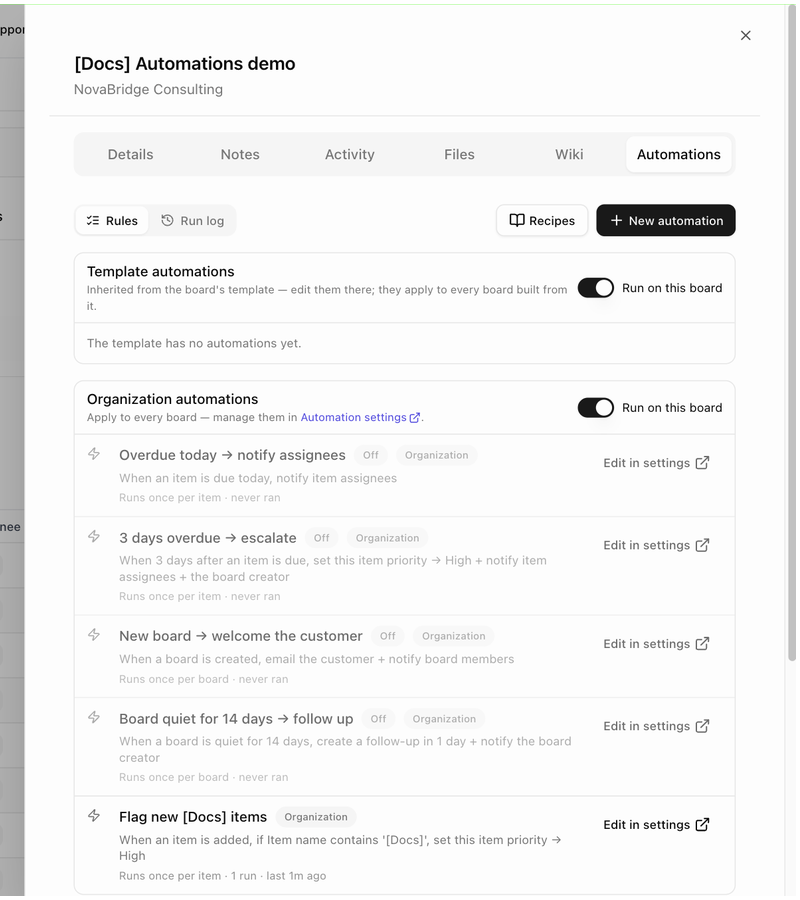 Open a board, click **⋮** in the header and choose **Automations**. The tab has a **Rules** / **Run log** toggle, a **Recipes** button and **New automation**, and lists up to three groups of rules:
- **Template automations**: *Inherited from the board's template — edit them there; they apply to every board built from it.* When the template has none, the group reads *The template has no automations yet.*
- **Organization automations**: *Apply to every board — manage them in Automation settings.* This group only appears once your organization has at least one organization rule.
- **Board-only automations**: *Rules that apply only to this board.* This is where **New automation** on a board puts its rules.
Inherited rows show a **From template** or **Organization** badge and a link (**Edit on template**, **Edit in settings**) instead of a switch, because the rule is shared with other boards.
If the board has no linked customer and any rule emails the customer, the tab warns: *This board has no customer — customer emails are skipped.*
## Pause inherited rules on one board
Each inherited group has a **Run on this board** switch. Turn it off to stop template or organization rules firing on this board without touching the template or the organization. The group then reads *Paused on this board — template rules won't fire here* (or *organization rules won't fire here*). Runs that were already waiting are cancelled, and the run log records the reason as *template automations are paused on this board* or *organization automations are paused on this board*.
Turn the switch back on at any time. Rules resume for new events; they do not catch up on events that happened while they were paused.
## A template's Automations tab
Open a board, click **⋮** in the header and choose **Automations**. The tab has a **Rules** / **Run log** toggle, a **Recipes** button and **New automation**, and lists up to three groups of rules:
- **Template automations**: *Inherited from the board's template — edit them there; they apply to every board built from it.* When the template has none, the group reads *The template has no automations yet.*
- **Organization automations**: *Apply to every board — manage them in Automation settings.* This group only appears once your organization has at least one organization rule.
- **Board-only automations**: *Rules that apply only to this board.* This is where **New automation** on a board puts its rules.
Inherited rows show a **From template** or **Organization** badge and a link (**Edit on template**, **Edit in settings**) instead of a switch, because the rule is shared with other boards.
If the board has no linked customer and any rule emails the customer, the tab warns: *This board has no customer — customer emails are skipped.*
## Pause inherited rules on one board
Each inherited group has a **Run on this board** switch. Turn it off to stop template or organization rules firing on this board without touching the template or the organization. The group then reads *Paused on this board — template rules won't fire here* (or *organization rules won't fire here*). Runs that were already waiting are cancelled, and the run log records the reason as *template automations are paused on this board* or *organization automations are paused on this board*.
Turn the switch back on at any time. Rules resume for new events; they do not catch up on events that happened while they were paused.
## A template's Automations tab
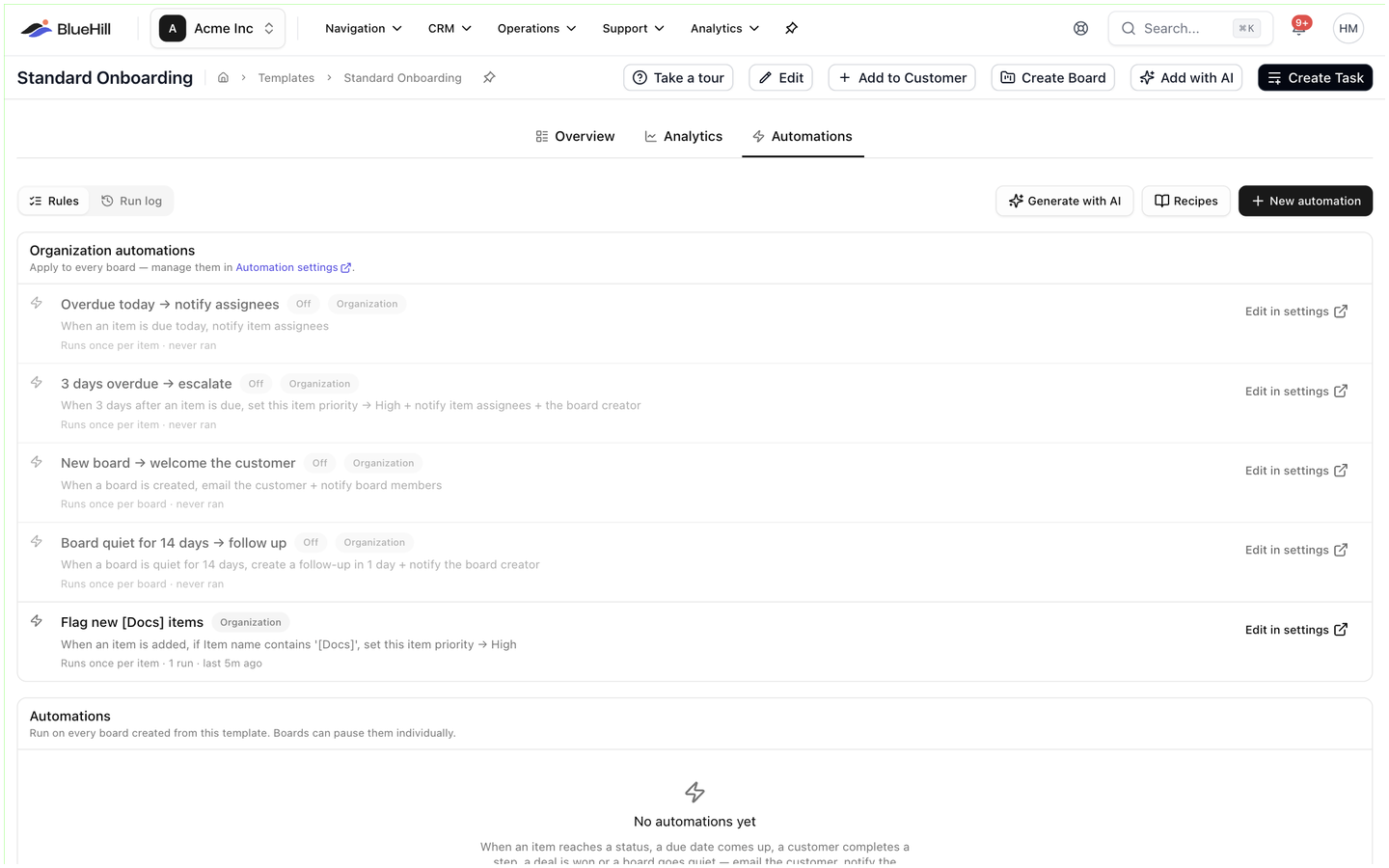 A template's rules are listed under **Automations** with the note *Run on every board created from this template. Boards can pause them individually.* Above them, an **Organization automations** group lists the organization's rules with **Edit in settings** links, just as on a board. The template tab adds a **Generate with AI** button next to **Recipes** and **New automation**: paste a process description and BlueHill drafts rules from sentences such as *when the kickoff call is done, email the customer*. Drafted rules are added switched off so you can review each one.
Changing a template rule changes it for every board built from the template, including boards that already exist. If a board stops using the template, waiting runs are cancelled with the reason *the board no longer uses this template*.
## A form's Workflow tab
A template's rules are listed under **Automations** with the note *Run on every board created from this template. Boards can pause them individually.* Above them, an **Organization automations** group lists the organization's rules with **Edit in settings** links, just as on a board. The template tab adds a **Generate with AI** button next to **Recipes** and **New automation**: paste a process description and BlueHill drafts rules from sentences such as *when the kickoff call is done, email the customer*. Drafted rules are added switched off so you can review each one.
Changing a template rule changes it for every board built from the template, including boards that already exist. If a board stops using the template, waiting runs are cancelled with the reason *the board no longer uses this template*.
## A form's Workflow tab
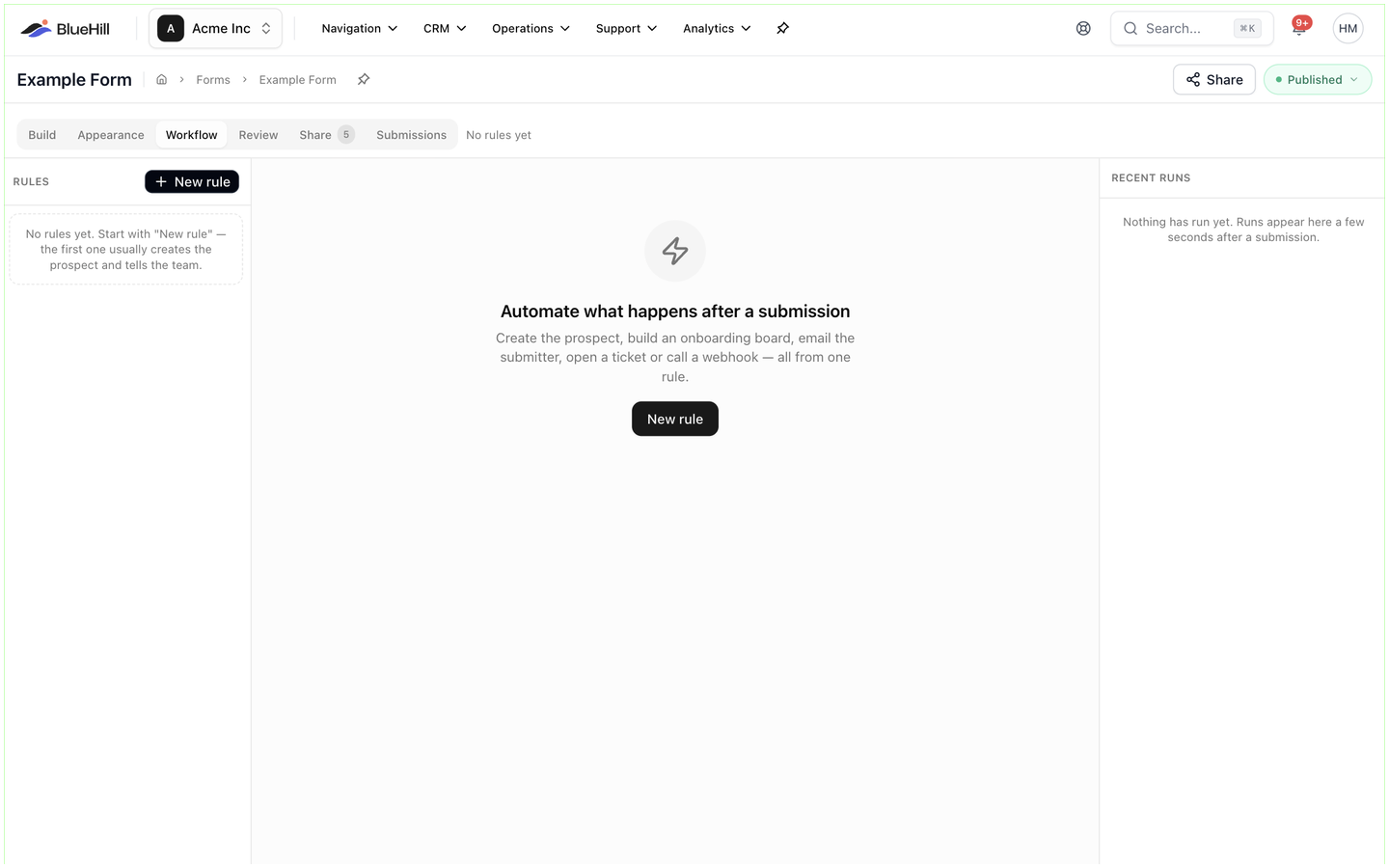 A form's **Workflow** tab uses the same rule editor with the form triggers. The left rail lists the form's **Rules** with a **New rule** button and a dot that shows whether each rule is **Enabled** or **Paused**; organization rules that also apply to the form are listed under **Also applies (organization)**. The editor has an **Enabled** switch and **Test with last submission**, which evaluates the rule against the latest submission without running anything. The right rail shows **Recent runs**.
Next: [Create and manage a rule](./automations-create-a-rule).
A form's **Workflow** tab uses the same rule editor with the form triggers. The left rail lists the form's **Rules** with a **New rule** button and a dot that shows whether each rule is **Enabled** or **Paused**; organization rules that also apply to the form are listed under **Also applies (organization)**. The editor has an **Enabled** switch and **Test with last submission**, which evaluates the rule against the latest submission without running anything. The right rail shows **Recent runs**.
Next: [Create and manage a rule](./automations-create-a-rule).