# Comments, mentions and change requests
> Source: https://support.usebluehill.com/wiki-comments-and-change-requests | Updated: 2026-10-27T15:21:53Z
## Comment on a passage
 1. Select some text, in the reading view or in the editor of a saved page. Two buttons appear above the selection: **Request change** and **Comment**.
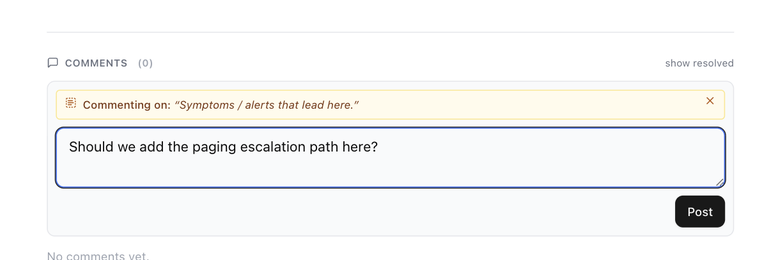
2. Click **Comment**. The composer opens with the passage quoted under **Commenting on:**. Click the **×** on that quote (**Comment on the page instead**) if the comment is about the whole page rather than the passage.
3. Write your comment and click **Post**.
1. Select some text, in the reading view or in the editor of a saved page. Two buttons appear above the selection: **Request change** and **Comment**.
2. Click **Comment**. The composer opens with the passage quoted under **Commenting on:**. Click the **×** on that quote (**Comment on the page instead**) if the comment is about the whole page rather than the passage.
3. Write your comment and click **Post**.
 Anyone who can view a page can comment on it; edit access is not needed. In the editor, the toolbar's **Comment on selection** button does the same as the floating **Comment** button.
## Mention a teammate
Type **@** in a comment or a reply and pick a teammate from the list. Their name is inserted as a chip, and when you post they get a notification in BlueHill and an email, **Name mentioned you on Page title**, with a **View comment** button that opens the page. Mentions of you are highlighted in the thread.
Nobody is notified by a comment that mentions no one, not even the page's owners, so mention the person you want to hear from.
## Where comments appear
Anyone who can view a page can comment on it; edit access is not needed. In the editor, the toolbar's **Comment on selection** button does the same as the floating **Comment** button.
## Mention a teammate
Type **@** in a comment or a reply and pick a teammate from the list. Their name is inserted as a chip, and when you post they get a notification in BlueHill and an email, **Name mentioned you on Page title**, with a **View comment** button that opens the page. Mentions of you are highlighted in the thread.
Nobody is notified by a comment that mentions no one, not even the page's owners, so mention the person you want to hear from.
## Where comments appear
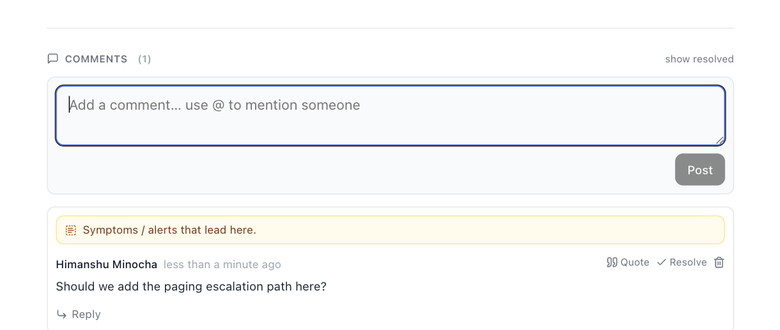 - In the **reading view**, comments live at the end of the article under **Comments (N)**: a box for a new comment first, then the threads. Resolved threads are hidden; click **show resolved** to see them, and **hide resolved** to tuck them away again. A page without comments says **No comments yet.**
- In the **editor** on a wide window, each thread sits in the margin beside its highlighted passage. Comments about the whole page collect in a box, **N comments on the page**. The **Show comments** / **Hide comments** button in the editor header toggles the margin and shows how many threads are open; clicking a highlight opens them too.
- In the **editor** on a narrower window, the same button opens a **Comments** panel on the right.
## Reply, resolve and delete
Each thread starts with the quoted passage, followed by the author, when they wrote it and the comment itself. Click the passage (**Jump to this text**) to scroll to the highlight; if the text has since been edited, the quote is struck through and marked **original text changed**. In the editor the passage is underlined in yellow.
| Action | What it does |
|---|---|
| **Reply** | Opens a reply box (**Reply… use @ to mention someone**) under the thread. |
| **Quote** | Starts a reply with the comment quoted. Quoting strips any mention from the quoted text, so nobody is notified twice. |
| **Resolve** / **Reopen** | Marks the thread as dealt with, or brings it back. Anyone can resolve or reopen a thread. A resolved thread no longer accepts replies and loses its margin card in the editor. |
| **Delete** (trash icon) | Removes the thread. Only the comment's author sees this button. The confirmation, **Delete comment thread?**, warns that **Replies will be removed too. This can't be undone.** |
## Request a change
A change request is a comment that asks for a specific fix and is tracked until it is dealt with. Select text and click **Request change** (or leave the selection empty for a request **About the whole page**). The **New request** card asks for:
- The type: **Factual error**, **Outdated**, **Missing info**, **Wording** or **Compliance**.
- **What needs to change**, where you can **@mention** anyone who should know.
- A **Suggested replacement (optional)**, which the author can apply with one click.
- The severity: **Blocking**, **Should fix** or **Nice to have**. A blocking request stops the page from being published until it is resolved or waived.
- **Assign to** and **Due**. The assignee is notified.
Requests are listed above the ordinary comments with a status: **Open**, **Addressed in vN**, **Accepted** or **Waived**. In the editor, an author with edit access can click **Apply suggestion** to replace the passage with the suggested text (then **Save** to keep it) and **Mark addressed**; the requester then **Accepts** the change or **Reopens** the request. Reviewers can **Waive** a blocking request. The review side of this, including the **Reviews** page, is described in the Help Center guides.
## Who is notified
| When | Who hears about it |
|---|---|
| A comment or reply mentions someone with **@** | The mentioned teammate (in BlueHill and by email). |
| A comment or reply mentions no one | Nobody. |
| A change request is filed | The person it is assigned to, plus anyone mentioned in it. |
| A change request is marked addressed | The person who filed it. |
| A review is requested, approved, declined, withdrawn or about to expire | The reviewers, the requester or the page's owners, as described in the Help Center guides. |
| A page is shared, pinned, restored or linked to a task | Nobody. |
Next: [Version history and restore](./wiki-version-history).
- In the **reading view**, comments live at the end of the article under **Comments (N)**: a box for a new comment first, then the threads. Resolved threads are hidden; click **show resolved** to see them, and **hide resolved** to tuck them away again. A page without comments says **No comments yet.**
- In the **editor** on a wide window, each thread sits in the margin beside its highlighted passage. Comments about the whole page collect in a box, **N comments on the page**. The **Show comments** / **Hide comments** button in the editor header toggles the margin and shows how many threads are open; clicking a highlight opens them too.
- In the **editor** on a narrower window, the same button opens a **Comments** panel on the right.
## Reply, resolve and delete
Each thread starts with the quoted passage, followed by the author, when they wrote it and the comment itself. Click the passage (**Jump to this text**) to scroll to the highlight; if the text has since been edited, the quote is struck through and marked **original text changed**. In the editor the passage is underlined in yellow.
| Action | What it does |
|---|---|
| **Reply** | Opens a reply box (**Reply… use @ to mention someone**) under the thread. |
| **Quote** | Starts a reply with the comment quoted. Quoting strips any mention from the quoted text, so nobody is notified twice. |
| **Resolve** / **Reopen** | Marks the thread as dealt with, or brings it back. Anyone can resolve or reopen a thread. A resolved thread no longer accepts replies and loses its margin card in the editor. |
| **Delete** (trash icon) | Removes the thread. Only the comment's author sees this button. The confirmation, **Delete comment thread?**, warns that **Replies will be removed too. This can't be undone.** |
## Request a change
A change request is a comment that asks for a specific fix and is tracked until it is dealt with. Select text and click **Request change** (or leave the selection empty for a request **About the whole page**). The **New request** card asks for:
- The type: **Factual error**, **Outdated**, **Missing info**, **Wording** or **Compliance**.
- **What needs to change**, where you can **@mention** anyone who should know.
- A **Suggested replacement (optional)**, which the author can apply with one click.
- The severity: **Blocking**, **Should fix** or **Nice to have**. A blocking request stops the page from being published until it is resolved or waived.
- **Assign to** and **Due**. The assignee is notified.
Requests are listed above the ordinary comments with a status: **Open**, **Addressed in vN**, **Accepted** or **Waived**. In the editor, an author with edit access can click **Apply suggestion** to replace the passage with the suggested text (then **Save** to keep it) and **Mark addressed**; the requester then **Accepts** the change or **Reopens** the request. Reviewers can **Waive** a blocking request. The review side of this, including the **Reviews** page, is described in the Help Center guides.
## Who is notified
| When | Who hears about it |
|---|---|
| A comment or reply mentions someone with **@** | The mentioned teammate (in BlueHill and by email). |
| A comment or reply mentions no one | Nobody. |
| A change request is filed | The person it is assigned to, plus anyone mentioned in it. |
| A change request is marked addressed | The person who filed it. |
| A review is requested, approved, declined, withdrawn or about to expire | The reviewers, the requester or the page's owners, as described in the Help Center guides. |
| A page is shared, pinned, restored or linked to a task | Nobody. |
Next: [Version history and restore](./wiki-version-history).