# Publish, pin, archive, move and delete a page
> Source: https://support.usebluehill.com/wiki-manage-a-page | Updated: 2026-10-27T15:21:53Z
## Read a page
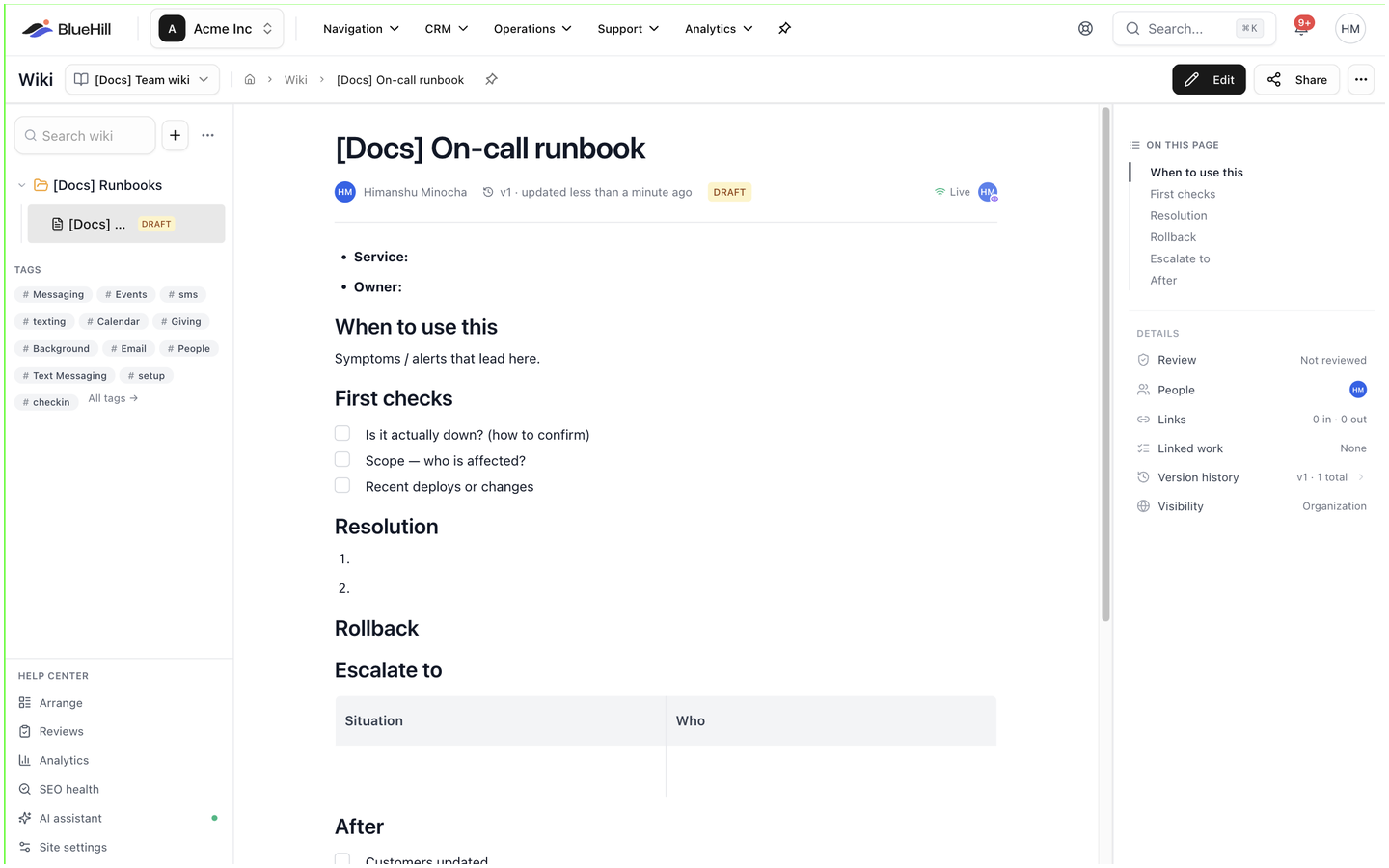 Open a page from the sidebar tree, the page list or a search result. The reading view shows:
- The **title** and description, the page's **owners** (two names are joined with *&*; more read *name & N others*; a page without owners shows its contributors instead), a review badge when the page has been reviewed, and a version link such as **v4 · updated 2 days ago** that opens the history.
- A **draft** or **archived** chip when the page is not published, a visibility chip when it is not visible to everyone, the page's tags, and the avatars of teammates reading or editing it right now.
- The header buttons **Edit**, **Share** and the **⋯** menu.
- **On this page**, a table of contents built from the headings, shown when the page has at least two. The current section is highlighted as you scroll.
- The **Details** rail, described below.
- The page's comments, at the end of the article, with a box for adding one. See [Comments, mentions and change requests](./wiki-comments-and-change-requests).
Links on a page open in a new tab. Anyone with edit access can tick a checklist box straight from the reading view.
## The Details rail
| Row | Shows |
|---|---|
| **Review** | **Not reviewed**, **In review**, **Approved**, **Expired** or **Edited since approval**. Click it to request a review. See [Ask for a review](#ask-for-a-review). |
| **People** | The page's owners. Click it for the **Owners** and **Contributors** panels. See [Owners](./wiki-share-and-permissions#owners). |
| **Links** | **N in · N out**: how many pages link here and how many this page links to. Click it for the lists. |
| **Linked work** | The tasks and boards this page is attached to. See [See what links to a page](./wiki-link-pages-to-work#see-what-links-to-a-page). |
| **Version history** | **vN · N total**. Click it to open the history. |
| **Visibility** | **Organization**, **Team** or **Private**. Change it from **Share**. |
Pages in a public knowledge base also show a **Search appearance** row and a help center performance card; see the Help Center guides.
## Draft, published or archived
Open a page from the sidebar tree, the page list or a search result. The reading view shows:
- The **title** and description, the page's **owners** (two names are joined with *&*; more read *name & N others*; a page without owners shows its contributors instead), a review badge when the page has been reviewed, and a version link such as **v4 · updated 2 days ago** that opens the history.
- A **draft** or **archived** chip when the page is not published, a visibility chip when it is not visible to everyone, the page's tags, and the avatars of teammates reading or editing it right now.
- The header buttons **Edit**, **Share** and the **⋯** menu.
- **On this page**, a table of contents built from the headings, shown when the page has at least two. The current section is highlighted as you scroll.
- The **Details** rail, described below.
- The page's comments, at the end of the article, with a box for adding one. See [Comments, mentions and change requests](./wiki-comments-and-change-requests).
Links on a page open in a new tab. Anyone with edit access can tick a checklist box straight from the reading view.
## The Details rail
| Row | Shows |
|---|---|
| **Review** | **Not reviewed**, **In review**, **Approved**, **Expired** or **Edited since approval**. Click it to request a review. See [Ask for a review](#ask-for-a-review). |
| **People** | The page's owners. Click it for the **Owners** and **Contributors** panels. See [Owners](./wiki-share-and-permissions#owners). |
| **Links** | **N in · N out**: how many pages link here and how many this page links to. Click it for the lists. |
| **Linked work** | The tasks and boards this page is attached to. See [See what links to a page](./wiki-link-pages-to-work#see-what-links-to-a-page). |
| **Version history** | **vN · N total**. Click it to open the history. |
| **Visibility** | **Organization**, **Team** or **Private**. Change it from **Share**. |
Pages in a public knowledge base also show a **Search appearance** row and a help center performance card; see the Help Center guides.
## Draft, published or archived
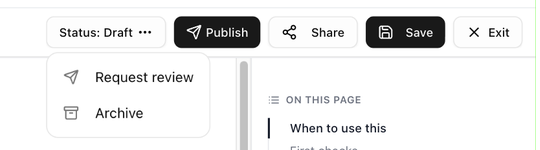 Every page is a draft, published or archived. In the editor, the **Status** button shows the current state and opens the actions:
| State | Status button | What you can do |
|---|---|---|
| Draft | **Status: Draft** | Click **Publish** to publish it, or open the menu for **Request review** and **Archive**. |
| Published | **Status: Published** | Open the menu for **Save as Draft**, **Request review** and **Archive**. |
| Archived | an **archived** chip | Click **Publish** to bring it back. In the reading view, **Restore to draft** in the **⋯** menu brings it back as a draft. |
- A **draft** is a page that is still being worked on. It is listed with a **draft** chip, and it can be read by anyone the page is shared with.
- A **published** page is finished. For an internal knowledge base this is simply a signal to your team; for a public knowledge base it is what puts the article on the help center.
- An **archived** page is kept out of the way: it drops to the **Archived** group at the bottom of the sidebar tree and off the help center, but stays searchable and keeps its history. **Archive** asks for no confirmation.
If **Publish** is greyed out, hover it. The tooltip explains why: the knowledge base requires an approved review, a review is still in progress or has expired, the page was edited after its approval, or a blocking change request is open. Owners and admins can publish regardless of reviews.
## Ask for a review
Any page can be reviewed, in an internal knowledge base as much as a public one. Click **Review** in the **Details** rail and choose **Request**, or pick **Request review** from the **Status** menu in the editor.
1. In the **Request review** dialog, **Add** one or more **Reviewers**. Each must approve for the page to count as reviewed.
2. Add a **Message (optional)** and check **Valid until**, which defaults to the knowledge base's review validity.
3. Click **Send review request**. The reviewers are notified, and the rail row changes to **In review**.
Review states, change requests and the **Reviews** page are described in detail in the Help Center guides.
## The page menu
Every page is a draft, published or archived. In the editor, the **Status** button shows the current state and opens the actions:
| State | Status button | What you can do |
|---|---|---|
| Draft | **Status: Draft** | Click **Publish** to publish it, or open the menu for **Request review** and **Archive**. |
| Published | **Status: Published** | Open the menu for **Save as Draft**, **Request review** and **Archive**. |
| Archived | an **archived** chip | Click **Publish** to bring it back. In the reading view, **Restore to draft** in the **⋯** menu brings it back as a draft. |
- A **draft** is a page that is still being worked on. It is listed with a **draft** chip, and it can be read by anyone the page is shared with.
- A **published** page is finished. For an internal knowledge base this is simply a signal to your team; for a public knowledge base it is what puts the article on the help center.
- An **archived** page is kept out of the way: it drops to the **Archived** group at the bottom of the sidebar tree and off the help center, but stays searchable and keeps its history. **Archive** asks for no confirmation.
If **Publish** is greyed out, hover it. The tooltip explains why: the knowledge base requires an approved review, a review is still in progress or has expired, the page was edited after its approval, or a blocking change request is open. Owners and admins can publish regardless of reviews.
## Ask for a review
Any page can be reviewed, in an internal knowledge base as much as a public one. Click **Review** in the **Details** rail and choose **Request**, or pick **Request review** from the **Status** menu in the editor.
1. In the **Request review** dialog, **Add** one or more **Reviewers**. Each must approve for the page to count as reviewed.
2. Add a **Message (optional)** and check **Valid until**, which defaults to the knowledge base's review validity.
3. Click **Send review request**. The reviewers are notified, and the rail row changes to **In review**.
Review states, change requests and the **Reviews** page are described in detail in the Help Center guides.
## The page menu
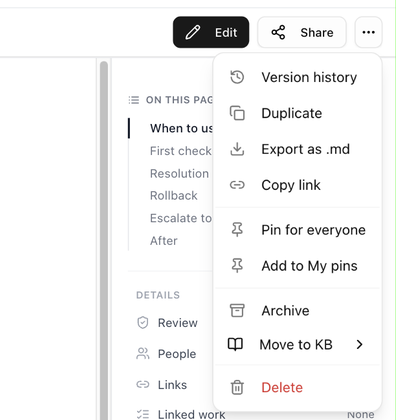 The **⋯** button in the page header opens:
| Item | What it does |
|---|---|
| **Version history** | Opens every saved version. See [Version history and restore](./wiki-version-history). |
| **Duplicate** | Copies the page as a new draft and opens it. |
| **Export as .md** | Downloads the page as a markdown file. |
| **Copy link** | Copies a link to the page. It pastes as the page's title in rich text and as the address in plain text. |
| **Pin for everyone** / **Unpin for everyone** | Pins the page in the **Pinned** section of the Wiki page for the whole workspace. Needs edit access. |
| **Add to My pins** / **Remove from My pins** | Pins the page for you only. |
| **Archive** / **Restore to draft** | Archives the page, or brings an archived page back as a draft. Needs edit access. |
| **Move to KB** | Moves the page to another knowledge base, chosen from the submenu. Moving a live article to an internal knowledge base takes it off the help center. |
| **Delete** | Moves the page to the trash. See [Delete a page](#delete-a-page). |
Pages in a public knowledge base add **View public page**, **Copy help center link** and **Feature on home**, described in the Help Center guides.
## Pin a page
Use **Add to My pins** for a page you come back to often; it appears under **My pins** on the Wiki page and nobody else sees it. Use **Pin for everyone** for a page the whole team should find at once, such as an on-call runbook; it appears under **Pinned** for everyone. See [Pins](./wiki-find-pages#pins).
## Move a page
- **Into a folder:** in the sidebar tree, open the page's **⋮** menu, choose **Move to folder…** and pick a folder or **Root**. Or drag the page onto the folder. See [Drag and drop](./wiki-knowledge-bases-and-folders#drag-and-drop).
- **Under another page:** open the page in the editor and, in the rail under **Settings**, click the **Parent page** button. Type in **Find a page…** and pick the parent, or choose **No parent (root page)** to move it back to the top level. Dragging a page onto another page in the tree does the same.
- **To another knowledge base:** choose **Move to KB** from the **⋯** menu.
## Delete a page
The **⋯** button in the page header opens:
| Item | What it does |
|---|---|
| **Version history** | Opens every saved version. See [Version history and restore](./wiki-version-history). |
| **Duplicate** | Copies the page as a new draft and opens it. |
| **Export as .md** | Downloads the page as a markdown file. |
| **Copy link** | Copies a link to the page. It pastes as the page's title in rich text and as the address in plain text. |
| **Pin for everyone** / **Unpin for everyone** | Pins the page in the **Pinned** section of the Wiki page for the whole workspace. Needs edit access. |
| **Add to My pins** / **Remove from My pins** | Pins the page for you only. |
| **Archive** / **Restore to draft** | Archives the page, or brings an archived page back as a draft. Needs edit access. |
| **Move to KB** | Moves the page to another knowledge base, chosen from the submenu. Moving a live article to an internal knowledge base takes it off the help center. |
| **Delete** | Moves the page to the trash. See [Delete a page](#delete-a-page). |
Pages in a public knowledge base add **View public page**, **Copy help center link** and **Feature on home**, described in the Help Center guides.
## Pin a page
Use **Add to My pins** for a page you come back to often; it appears under **My pins** on the Wiki page and nobody else sees it. Use **Pin for everyone** for a page the whole team should find at once, such as an on-call runbook; it appears under **Pinned** for everyone. See [Pins](./wiki-find-pages#pins).
## Move a page
- **Into a folder:** in the sidebar tree, open the page's **⋮** menu, choose **Move to folder…** and pick a folder or **Root**. Or drag the page onto the folder. See [Drag and drop](./wiki-knowledge-bases-and-folders#drag-and-drop).
- **Under another page:** open the page in the editor and, in the rail under **Settings**, click the **Parent page** button. Type in **Find a page…** and pick the parent, or choose **No parent (root page)** to move it back to the top level. Dragging a page onto another page in the tree does the same.
- **To another knowledge base:** choose **Move to KB** from the **⋯** menu.
## Delete a page
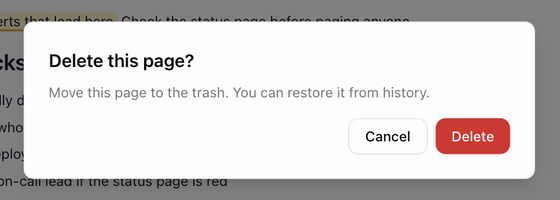 Choose **Delete** from the page's **⋯** menu, or from its **⋮** menu in the sidebar tree. The confirmation, **Delete this page?**, explains that the page is moved to the trash. It disappears from the tree, the page list and search, and links to it show as broken until it is restored. The dialog in the tree reads **Move "title" to trash?** and confirms with **Move to trash**.
If you only want a page out of the way, archive it instead; archived pages keep their place in search and their history.
Next: [Comments, mentions and change requests](./wiki-comments-and-change-requests).
Choose **Delete** from the page's **⋯** menu, or from its **⋮** menu in the sidebar tree. The confirmation, **Delete this page?**, explains that the page is moved to the trash. It disappears from the tree, the page list and search, and links to it show as broken until it is restored. The dialog in the tree reads **Move "title" to trash?** and confirms with **Move to trash**.
If you only want a page out of the way, archive it instead; archived pages keep their place in search and their history.
Next: [Comments, mentions and change requests](./wiki-comments-and-change-requests).