# Version history and restore
> Source: https://support.usebluehill.com/wiki-version-history | Updated: 2026-10-27T15:21:53Z
## Open the history
Every **Save** in the editor stores a new version of the page. To see them:
- Click the **vN · updated …** link under the page title.
- Choose **Version history** from the page's **⋯** menu.
- Click the **Version history** row in the **Details** rail.
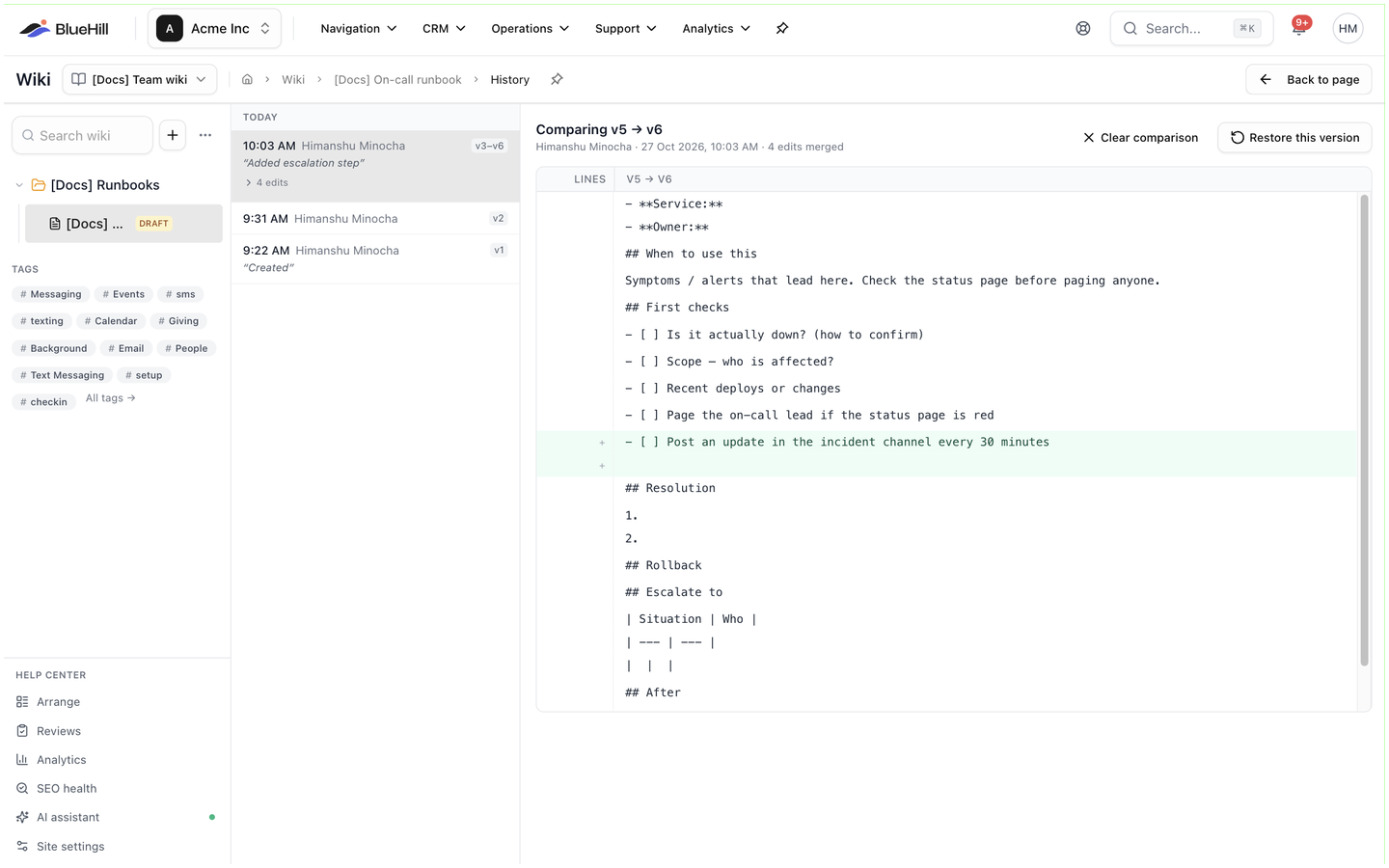 The history page lists the versions on the left and shows what changed on the right. **Back to page** returns to the reading view.
## Read the list
- Versions are grouped by day: **Today**, **Yesterday** or the date.
- Each entry shows the time, who saved it and a version chip such as **v12**. The first version is labelled *Created*. The newest entry is selected when the page opens.
- Saves by the same person less than ten minutes apart are merged into one entry, for example **v9–v12** with a **4 edits** link that expands to the individual saves.
- A version that was given a label shows it in italics, for example *Reviewed by legal*.
- The list shows thirty entries at a time; **Show earlier versions (N more)** loads the rest.
## See what changed
Select an entry to see its changes on the right. The heading reads **What changed in vN** (**What changed in v3–v5 · 3 edits merged** for a merged entry, or **Page created** for the first version), with the author and the exact time underneath. The diff is shown as lines: added lines in green with a **+**, removed lines in red with a **−**, under a header such as **v11 → v12**. If only the title changed, the pane says **No text changes** and shows the old and new titles.
To compare two versions that are not next to each other, open **Compare to…** and pick the earlier one. The heading becomes **Comparing vX → vN**; **Clear comparison** goes back to the single entry.
## Name a version
Before an important save, click the tag icon in the editor header (**Name this version (optional)**), type a label such as *Reviewed by legal* and save. The label appears next to that version in the history, which makes it easy to find later. The label applies to that one save only.
## Restore a version
The history page lists the versions on the left and shows what changed on the right. **Back to page** returns to the reading view.
## Read the list
- Versions are grouped by day: **Today**, **Yesterday** or the date.
- Each entry shows the time, who saved it and a version chip such as **v12**. The first version is labelled *Created*. The newest entry is selected when the page opens.
- Saves by the same person less than ten minutes apart are merged into one entry, for example **v9–v12** with a **4 edits** link that expands to the individual saves.
- A version that was given a label shows it in italics, for example *Reviewed by legal*.
- The list shows thirty entries at a time; **Show earlier versions (N more)** loads the rest.
## See what changed
Select an entry to see its changes on the right. The heading reads **What changed in vN** (**What changed in v3–v5 · 3 edits merged** for a merged entry, or **Page created** for the first version), with the author and the exact time underneath. The diff is shown as lines: added lines in green with a **+**, removed lines in red with a **−**, under a header such as **v11 → v12**. If only the title changed, the pane says **No text changes** and shows the old and new titles.
To compare two versions that are not next to each other, open **Compare to…** and pick the earlier one. The heading becomes **Comparing vX → vN**; **Clear comparison** goes back to the single entry.
## Name a version
Before an important save, click the tag icon in the editor header (**Name this version (optional)**), type a label such as *Reviewed by legal* and save. The label appears next to that version in the history, which makes it easy to find later. The label applies to that one save only.
## Restore a version
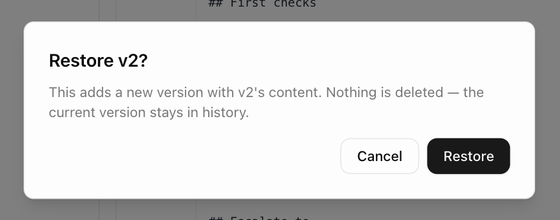 1. Select the version you want back and click **Restore this version**.
2. Confirm in **Restore vN?**. As the dialog says, this adds a new version with that content; nothing is deleted, and the current version stays in the history.
You are taken back to the page, which now shows the restored content as its newest version. If you change your mind, restore the version you came from in the same way.
## How long versions are kept
Every saved version is kept for as long as the page exists. There is no limit on their number.
Next: [Link pages to boards, tasks and tickets](./wiki-link-pages-to-work).
1. Select the version you want back and click **Restore this version**.
2. Confirm in **Restore vN?**. As the dialog says, this adds a new version with that content; nothing is deleted, and the current version stays in the history.
You are taken back to the page, which now shows the restored content as its newest version. If you change your mind, restore the version you came from in the same way.
## How long versions are kept
Every saved version is kept for as long as the page exists. There is no limit on their number.
Next: [Link pages to boards, tasks and tickets](./wiki-link-pages-to-work).