
Payment terms and schedule
For anyone deciding when a customer pays: due dates, deposits and installments, the recurring billing schedule, late fees and automatic reminders. All of it lives in the Payment terms card.
The Payment terms card
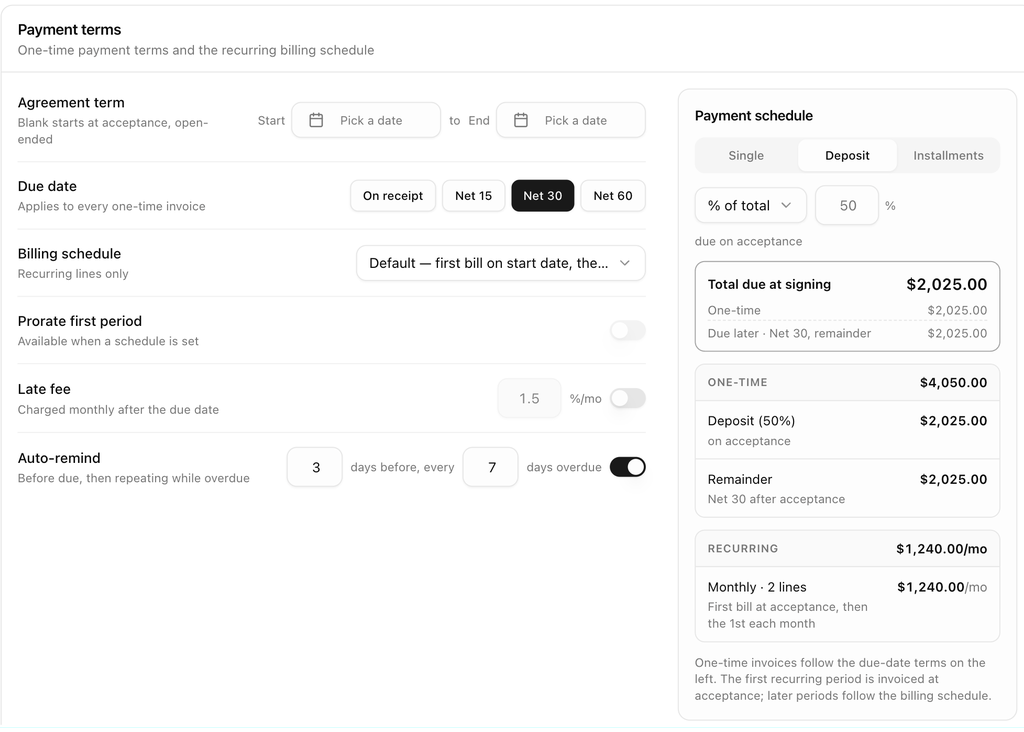
The card sits under the quote. Its left side holds the settings rows; its right side previews the payment schedule those settings produce. Changes are saved with Save changes in the header, except the reminder days, which save as soon as you leave the field.
Agreement term
Start and End set the term of the agreement.
- Leave both blank and the agreement starts when the customer accepts and runs open-ended.
- Set a future Start and everything anchors to it: recurring billing begins on that date and one-time lines are billed then too, unless you tick At signing on a line. The hint reads Starts Sep 1 · open-ended or similar.
- Set an End and recurring billing stops after that date. The end date must be after the start date.
Due date for one-time invoices
Due date applies to every one-time invoice in the room: On receipt, Net 15, Net 30 or Net 60. Net terms count from the day the invoice is issued.
Billing schedule for recurring lines
Billing schedule sets the day recurring lines bill on:
| Option | What it does |
|---|---|
| Default — first bill on start date, then the 1st | The first bill is on the start date (or acceptance); later bills fall on the 1st of the month. |
| Same day each month (start date's day) | Bills on the same day of the month as the start date. |
| 1st of the month | Bills on the 1st. |
| Last day of the month | Bills on the last day. |
| Fixed day of the month | Bills on the Day you enter, 1 to 31. |
Prorate first period bills a partial first period when the start date is not on the billing day, instead of a full period. It is available once a schedule other than Default is chosen. The hint under it shows the resulting rule, such as Bills on the 1st each month · first period prorated.
Individual lines can override this schedule. See Set when a recurring line bills. New rooms start with the schedule set in your organization or sales group settings.
Late fee
Switch on Late fee to charge a monthly percentage on invoices that stay unpaid after their due date. The rate defaults to 1.5 %/mo. The fee is added to the invoice and shown as incl. late fee wherever the amount appears.
Automatic reminders
Auto-remind sends the customer an email before an invoice is due and keeps reminding while it is overdue. The two fields read N days before, every N days overdue; both accept 1 to 90 days and save immediately. New rooms start with the days set in your settings, normally 3 days before and every 7 days. Switch the row off to stop automatic reminders for this room. See Reminders.
Split the one-time total
The segmented control at the top of the schedule preview chooses how the one-time total is invoiced:
| Option | What it does |
|---|---|
| Single | One invoice for the whole one-time total, due per the due-date terms. |
| Deposit | A deposit due on acceptance, then a remainder invoice due per the terms. Choose % of total or Fixed amount and enter the value, for example 50 for half up front. |
| Installments | Equal installments, the first due per the terms and the rest every N days. Set the number (2 to 24, default 3) and the interval in days (default 30). |
Read the payment schedule preview
The right side of the card shows what the customer will be asked to pay and when:
- Total due at signing adds up the one-time amount due at acceptance (the deposit, the first installment or the whole total, plus any lines marked At signing) and the first recurring period when it is billed at acceptance. A line underneath says what is Due later and under which terms.
- ONE-TIME previews each invoice the split will create, such as Deposit (50%) · on acceptance and Remainder · Net 30 after acceptance. Once the quote is accepted it lists the real invoices with their due or paid dates and status.
- RECURRING shows one row per cadence (Monthly · 2 lines) with its billing rule, the estimated first bill when prorated, and the Next bills with their dates and amounts.
The footer repeats the rules in words: one-time invoices follow the due-date terms, and recurring periods are either invoiced at acceptance or by the billing sweep on the schedule above.
Next: Documents and signature.