
Check the run log
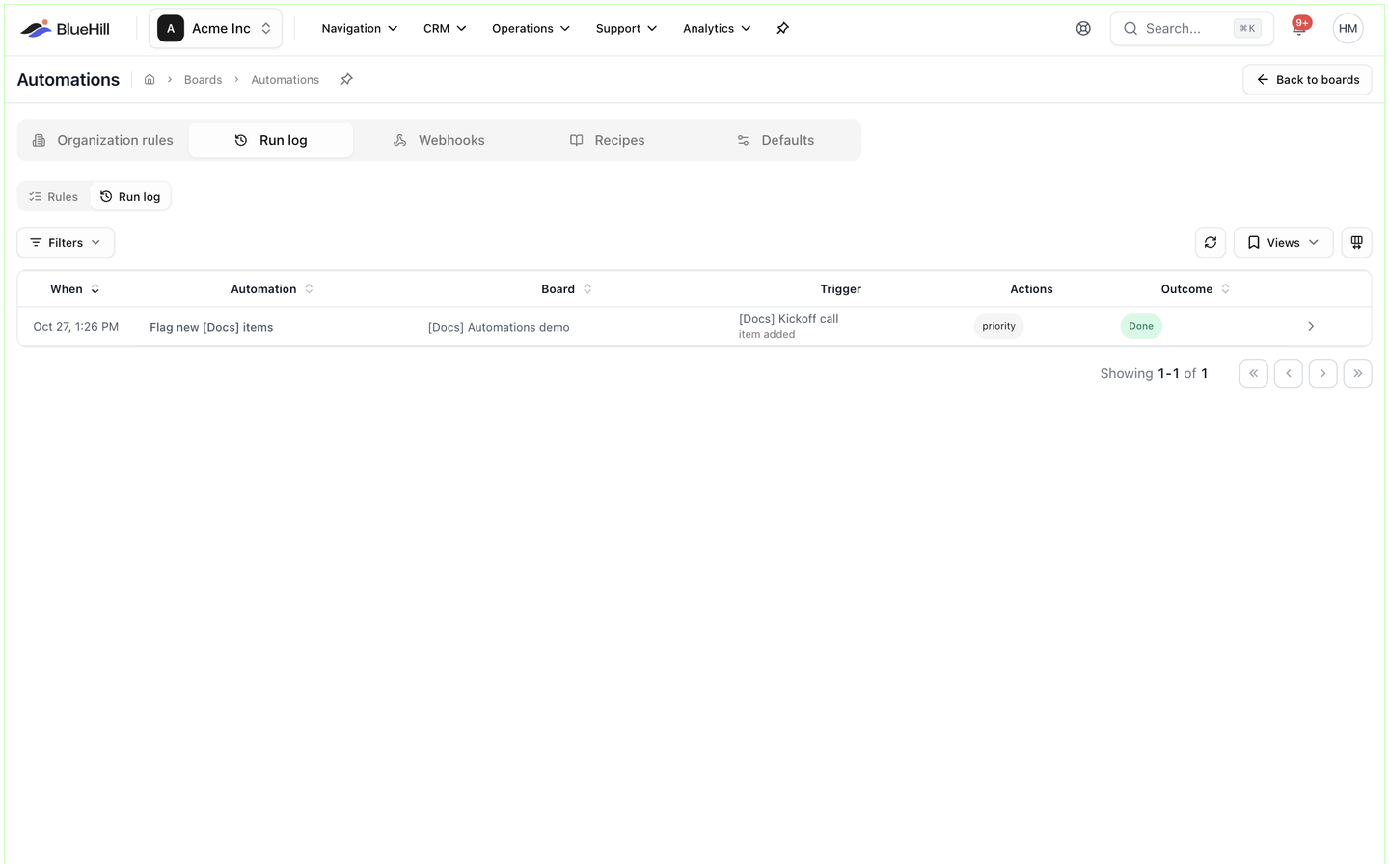
For anyone asking "did the rule fire, and what did it do?". Every run is recorded with its outcome and the result of each action.
Where to find it
- Operations → Automations → Run log lists the runs of organization rules.
- On a board or a template, switch the Automations tab from Rules to Run log to see the runs on that board or on boards built from that template.
- On a form's Workflow tab, the Recent runs rail lists the latest runs for the form.
Until something has run, the log reads No runs yet: Every time an automation fires it shows up here with what it did — or why it was skipped.
The run table
| Column | Shows |
|---|---|
| When | When the rule fired. A held run adds a second line, runs at …, with the reason it is waiting. |
| Automation | The rule's name. |
| Board | The board, or a dash for deal and customer runs. |
| Trigger | What fired it: the item, board, customer or deal on the first line and the trigger name underneath. chained ×N marks a run that another automation set off. |
| Actions | A short badge per action, such as email, notify or update · set item status, marked (skipped) or (failed) when needed. |
| Outcome | The run's status and, where there is one, the reason. |
Click a row to open the run. The toolbar also has Refresh, Views for saving a set of filters, and a column picker.
Filter runs
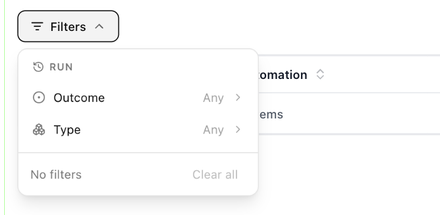
The Run filter panel has two fields: Outcome, with the statuses below, and Type: Items, Boards, Deals, Customers, Form submissions or Digests.
Run statuses
| Status | Meaning |
|---|---|
| Queued | About to run. |
| Scheduled | Waiting for its time: waiting out the delay, waiting for business hours, waiting for a weekday or scheduled digest. |
| Running | In progress. |
| Done | Finished. Individual actions may still have been skipped; open the run to see. |
| Failed | At least one action could not complete, for example a webhook that never answered. |
| Cancelled | Stopped before it ran. The run says why. |
| Skipped | The rule fired but had nothing to do, for example because the conditions did not match. |
The run detail
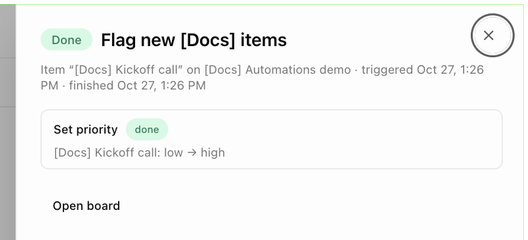
Opening a run shows its status and rule name, then a line such as Item "Kickoff call" on Automations demo · triggered Oct 27, 1:26 PM · finished Oct 27, 1:26 PM. Each action gets a card with an outcome badge (done, skipped or failed) and the detail of what happened: Kickoff call: low → high under Set priority, the To and Subject of an email with the sent message underneath, the notification Title and N notified, N emailed, Follow-up on …, Added "Live", Archived · status set to Complete, the ticket reference with an open link, the webhook delivery, or Created "…" (8 items) with an open board link. Skipped actions give the reason, for example the board has no linked customer.
Buttons at the bottom:
- Cancel run on a queued or scheduled run. BlueHill confirms with Run cancelled.
- Retry failed steps on a failed run. The run is queued again and only the failed actions are repeated.
- Open board, Open deal room or Open customer to jump to the record.
Why a run was cancelled
A cancelled run shows Stopped because … with one of these reasons:
| Reason | What happened |
|---|---|
| the automation was deleted / the automation was switched off | Someone deleted or paused the rule while the run was waiting. |
| the board was archived | Archiving a board cancels its pending runs. |
| the board no longer uses this template | The board was moved off the template that owns the rule. |
| template automations are paused on this board / organization automations are paused on this board | Run on this board was switched off. See Pause inherited rules on one board. |
| the item or record is gone, merged, archived or moved to another board | The subject of the run no longer exists where the rule expects it. |
| the condition stopped being true before it ran | A delayed run re-checked its conditions and they no longer matched. |
| activity resumed before it ran | An inactivity rule was waiting and the item or board became active again. |
| too many chained automations (loop guard) | Automations set each other off more than three times in a row. |
| cancelled by a team member | Someone clicked Cancel run. |
Next: Start from a recipe.