
Triggers
For anyone choosing what should start a rule. This is the reference for every trigger in the When picker, grouped the way the picker groups them.
The trigger picker
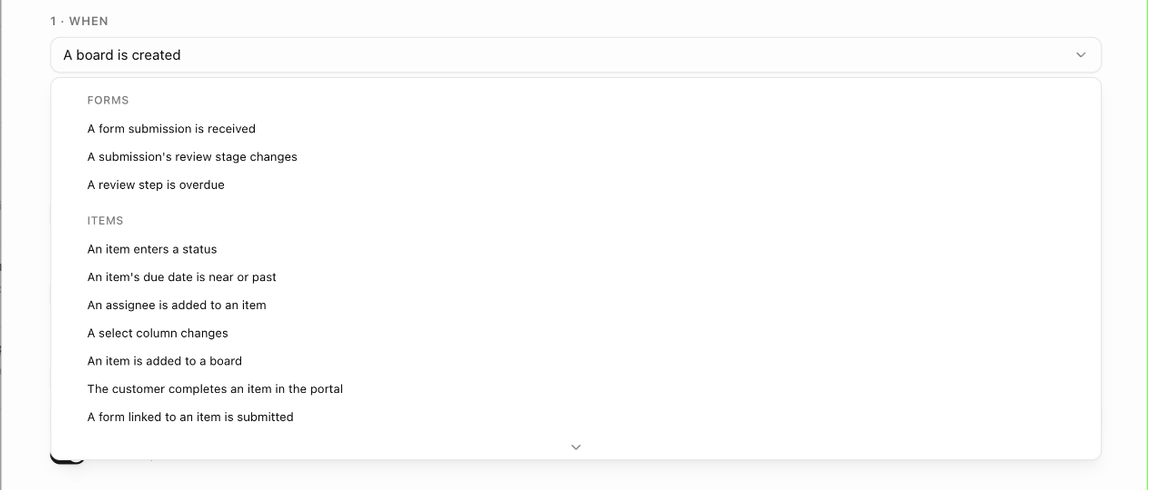
Under 1 · When, the picker lists triggers under five headings: Forms, Items, Boards, Customers & deals and Scheduled digests. A template or board shows only the triggers it can use; the organization shows all of them. See Which triggers each scope offers.
Some triggers fire the moment something happens. Others are checked on a schedule: due dates, follow-up dates and inactivity are checked every 15 minutes in your organization's timezone and fire at the hour you choose, and digests run on their own cadence. Scheduled triggers cannot be combined with a delay and always run once per item or board.
Items

| Trigger | Settings | Notes |
|---|---|---|
| An item enters a status | Enters status (required) and Coming from (Any status by default). | The most common trigger. Combine with conditions on priority, assignee or template. |
| An item is added to a board | None. | Fires when an item is added to an existing board, not for the items a new board starts with. |
| The customer completes an item in the portal | None. | Fires only when the customer ticks the item off in the portal, not when your team completes it. |
| A form linked to an item is submitted | Form (Any form linked to an item by default). | For task forms the customer fills in from the portal. |
| A note is added | Note source: Any note, Item note, Board note or Customer timeline. | Board-level notes fire with no item. Notes written by automations never fire this trigger. |
| An item's priority changes | Becomes and Coming from (Any priority by default; Low, Medium, High, Critical). | |
| An item's due date changes | Direction: Any change, Pushed later, Pulled earlier, Set (was empty) or Cleared. | |
| An item's due date is near or past | Days before the due date, On the due date or Days after the due date; the number of days (1 to 365); and the hour (at). | Checked every 15 minutes in your organization's timezone; fires once per date. Completed items are skipped. |
| An assignee is added to an item | When this person is assigned (Anyone by default). | |
| An assignee is removed from an item | When this person is unassigned (Anyone by default). | |
| A select column changes | Select column and Becomes. | Needs at least one select (dropdown) column on the board: No select columns here yet — add one in the columns manager first. |
| A linked support ticket is resolved | None. | Fires for each board item linked to the ticket when the ticket becomes solved or closed. |
| An item has had no activity for N days | No activity for N days, checked at an hour. | Activity means edits, status changes, notes and activity feed entries. Completed items and completed boards are skipped. Fires again only after new activity goes quiet again. |
| An item's follow-up date arrives | Same as the due-date trigger, measured from the item's follow-up date. |

Boards
| Trigger | Settings | Notes |
|---|---|---|
| The board's status changes | Board status becomes (required) and Coming from (Any status by default). | Board statuses are On Track, Stalled, Complete and so on. |
| A board is created | None. | Fires when a board is created from a template, imported or built by an automation. Narrow it with conditions such as Board template or Customer category. |
| The board reaches a % complete | The percentage (1 to 100). | Fires when the board's weighted % complete crosses the number; fires again only if the board drops below and crosses it again. |
| A board has had no activity for N days | No activity for N days, checked at an hour. | Same rules as item inactivity. |
| A board follow-up date arrives | Same as the due-date trigger, measured from the board's follow-up date. |
Customers & deals
These three triggers are available on organization rules only.
| Trigger | Settings | Notes |
|---|---|---|
| A deal / quote is accepted | None. | Fires when a quote is accepted, from the public link or marked accepted internally. Add a Sales group condition to narrow it. |
| A customer or prospect is created | Which records: Customers and prospects, Customers only or Prospects only. | Fires for records created in the app, through the API or captured from a booking, never for bulk imports. Narrow it with Customer category, Customer owner, Prospect source or Pipeline stage. |
| A prospect is converted to a customer | None. | Fires when a prospect becomes a customer, converted by hand or by an accepted or paid quote. |
Forms
These triggers are available on a form's Workflow tab and as organization rules, which ask for the Form.
| Trigger | Settings | Notes |
|---|---|---|
| A form submission is received | A submission is received from: any source, public link, customer link, in-app, task form (portal) or booking. | Fires for every submission of the form. |
| A submission's review stage changes | The board card moves to (New, In review, Needs changes, Approved or Rejected) and from (any stage). | A reviewer's decision or a drag on the Submissions board. Approved is where the prospect converts and the submitter is told. |
| A review step is overdue | A review step is N hours past its due time (0 to 720). | Checked every few minutes while the step stays open; fires once per step. |
Scheduled digests
| Trigger | Settings | Notes |
|---|---|---|
| Scheduled: overdue items digest | Cadence (Every day, Every weekday or Once a week with a weekday) and the hour. | Each assignee gets their overdue items, or each board creator a per-board summary. Nothing is sent when there is nothing overdue. |
| Scheduled: customer progress report | Cadence and hour, as above. | The customer's primary contact gets a progress report per board, listing published items only. |
Digest rules have no If section and no Timing section; their only action is Send the digest email. See Scheduled digests.
Next: Conditions.