
AI answers and Ask AI chat
For the admin who switches on the AI assistant and tunes how it answers. Everything the assistant says comes from your published articles; the settings shape wording, length and what visitors are offered next.
AI features need the AI plan feature. The AI assistant card tells you when they are not enabled yet.
Two kinds of help
- AI answers are instant, single answers. A visitor types a question into search, or starts a contact request, and gets an answer written from your articles with numbered citations. They are on by default.
- Ask AI (conversational chat) is a multi-turn chat with saved conversations for signed-in portal users. It is off by default and needs AI answers to be on.
The AI assistant card
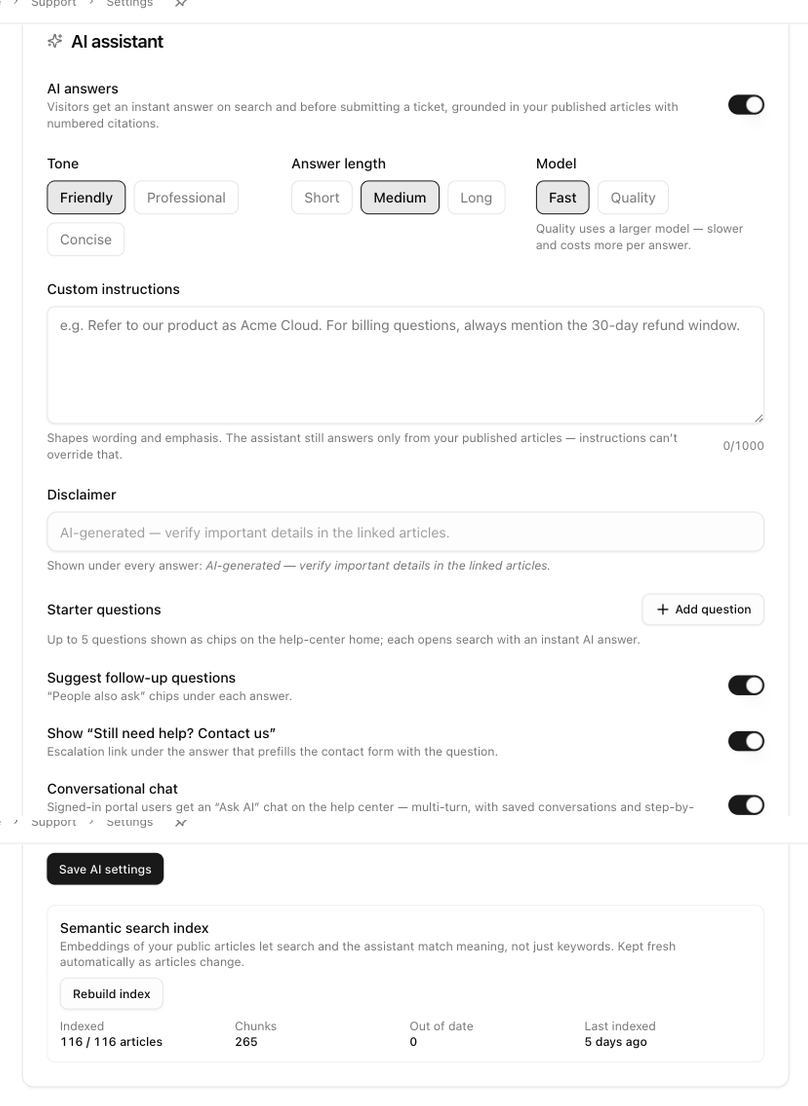
Open Support → Support settings → Help center, pick the site, and scroll to AI assistant.
| Setting | What it does |
|---|---|
| AI answers | The main switch. Saves immediately. |
| Tone | Friendly (default), Professional or Concise. |
| Answer length | Short, Medium (default) or Long. |
| Model | Fast (default) or Quality. Quality uses a larger model, which is slower and costs more per answer. |
| Custom instructions | Up to 1000 characters that shape wording and emphasis, for example how to refer to your product. The assistant still answers only from your published articles; instructions cannot override that. |
| Disclaimer | A line shown under every answer. The default is AI-generated — verify important details in the linked articles. |
| Starter questions | Up to five questions shown as chips on the home page and in the chat's empty state. Each opens search with an instant answer. |
| Suggest follow-up questions | People also ask chips under each answer. |
| Show "Still need help? Contact us" | An escalation link under the answer that opens the contact form with the question filled in. Needs the contact form to be on. |
| Conversational chat | Turns on Ask AI for signed-in portal users. |
Switches save immediately. Fields are saved with Save AI settings.
Semantic search index
The Semantic search index block shows how many articles are indexed, how many chunks exist, how many are out of date and when the index was last built. The index lets search and the assistant match meaning rather than exact words, and it is refreshed automatically as articles change. Rebuild index forces a full rebuild, for example after a large import.
If the block says Not enabled on this server (keyword search only), ask us to turn semantic search on.
What visitors get
On the search page. An AI answer card sits above the results. The answer streams in with numbered citations and a Sources list, followed by the disclaimer, Was this helpful? with Yes and No, the People also ask chips, Continue in chat when the chat is on, and Still need help? Contact us. A No vote asks what was missing. When the articles do not cover the question, the card says so and points at the results below.
In the ⌘K palette. Typing a question shows an Ask the assistant row; choosing it shows the same compact answer in place.
On the contact page. Get an instant answer in the Before you submit panel answers the draft request before the visitor sends it.
Ask AI chat. With conversational chat on, the header gains Ask AI, a floating Ask AI pill appears on every page, and AI answers end with Continue in chat. The chat opens as a side panel or as a full page with a list of past conversations grouped by day, New chat, renaming and deleting. On an article page the panel starts with Asking about that article. Every answer cites its sources, offers follow-ups and can be rated.
The chat needs a signed-in portal account. Signed-out visitors see Sign in to chat with the assistant with Sign in and Sign up buttons. Daily limits apply; when one is reached the chat says so and suggests trying again tomorrow.
See what people ask
Analytics → Knowledge base has an AI assistant section with the top questions, the unanswered ones, the articles the assistant cites most and the helpful rate of its answers. Admins can also open every chat conversation and read the transcript. See AI assistant.
The Help center tab's AI strip summarizes the same numbers and its Tune button brings you back to the card.